Everything posted by $hitblast
-
Yes. Props to you, ilko.
-
Yes, it just needed to be made active. It now works. Thanks alot ilko.
-
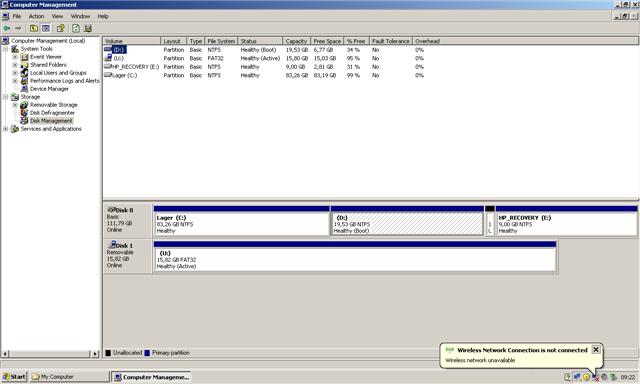
Greetings again. I tried installing to another machine; a HP Mini Note 2133 (2GB-version). It went slowly (FAT32) but surely (~100min) and Windows got installed just fine without errors. However, I cannot boot the installation without booting it through the stick. I've tried recovery console from the stick, logging onto the installed windows, then using fixmbr and fixboot, but to no avail. I have three partitions on the disk, one blank, one with xp and one backup-partition preinstalled from HP. In windows, the windows-partition is marked as "boot" and "system." Any ideas? And yes, I've changed the boot-sequence in bios back to internal hard drive.
-
I had to put in 3 instead of 2; that made it work. Windows now installed. One file was missing from the installation, but it worked just fine anyways. I'm at work right now, so I can't post the output, but your feedback was what it took, though. Thanks.
-
See my previous post. I prepared to USB for a full installation and uploaded the logfile.
-
Here it is. Had to compress it. WinSetupFromUSB.rar
-
Using 0.2.2 on WinXpProSp3. I'm using the HP format-option by the way, and a 2GB stick.
-
The "making-the-stick-part" seems to go just fine. However, when I put in in the computer I want to install onto, it goes straight to the second part, and the second part does not work; it immediately error-messages me. I've tried all the options available from boot.ini. I've also tested it on a second computer, and the same thing happens. What might be the cause of this?
-
So, I rolled back the S-ATA-drivers till the earliest known version, without it helping any. However, I kept rolling back through all the versions of nLite till I got to 1.0 RC8. This one works, though off course it's missing the functionality of later releases. Any ideas? And yes, my hardware: Socket A mobile 2600+ barton-core@3500+ on Asus A7N8X-E Deluxe.
-
I've installed several nlite-modded versions of nlite on this computer, and I haven't changed any of its hardware since the last installation. However, this time, I get bluescreened as setup states it is done loading setup-files and is about to start windows. I tried my previously modded windows, and it installed fine. Thereafter, I did the process over again with no modifications to windows whatsoever, except for integrating S-ATA-drivers, and made another bootable CD from it. The same bluescreen appeared. Then, I tried it in my laptop, and there, it worked. Any ideas? I suspect it may have something to do with the S-ATA-drivers, but that was never a problem before.