Skip to content
View in the app

A better way to browse. Learn more.

MSFN

A full-screen app on your home screen with push notifications, badges and more.

To install this app on iOS and iPadOS
  1. Tap the Share icon in Safari
  2. Scroll the menu and tap Add to Home Screen.
  3. Tap Add in the top-right corner.
To install this app on Android
  1. Tap the 3-dot menu (⋮) in the top-right corner of the browser.
  2. Tap Add to Home screen or Install app.
  3. Confirm by tapping Install.

kwiss

Member
  • Joined

  • Last visited

  • Country

    France
  1. Thank you. What about the Command-Line Tools? Can I remove them? I rembember that I had problems installing Windows XP after removing them; but I'm not sure that the problem came from them.
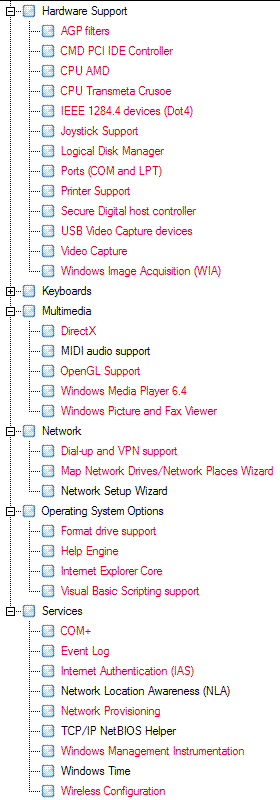
  2. Hi everybody! I've already searched within this forum but I didn't find explanations. Can someone explain me what can I remove between these elements and if not, why ? -CMD PCI IDE Controller -CPU Transmeta Crusoe -Network Setup Wizard -COM+ -Event Log -Internet Authentication (IAS) -Network Location Awareness (NLA) -TCP-IP NetBIOS Helper -Command-line Tools I have an AMD CPU (but I don't add any driver for it), I use FireFox, Gaim, Office Word (2003), µTorrent, Real, Winamp 2.95, Media Player Classic (with FFDShow), World Of Warcraft, Raid drivers, Wireless (with Wireless Zero Config) and sometimes Ethernet port. Thanks for all. Last_Session.ini


Account

Navigation

Configure browser push notifications

Chrome (Android)
  1. Tap the lock icon next to the address bar.
  2. Tap Permissions → Notifications.
  3. Adjust your preference.
Chrome (Desktop)
  1. Click the padlock icon in the address bar.
  2. Select Site settings.
  3. Find Notifications and adjust your preference.