Skip to content
View in the app

A better way to browse. Learn more.

MSFN

A full-screen app on your home screen with push notifications, badges and more.

To install this app on iOS and iPadOS
  1. Tap the Share icon in Safari
  2. Scroll the menu and tap Add to Home Screen.
  3. Tap Add in the top-right corner.
To install this app on Android
  1. Tap the 3-dot menu (⋮) in the top-right corner of the browser.
  2. Tap Add to Home screen or Install app.
  3. Confirm by tapping Install.

Emperor Nicon

Member
  • Joined

  • Last visited

  • Country

    United States

Everything posted by Emperor Nicon

  1. I tried it it doesnt get that result i need, sorry
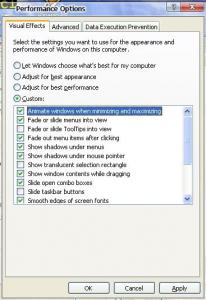
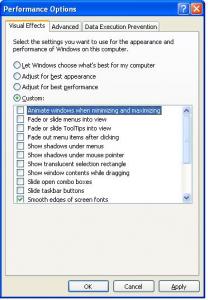
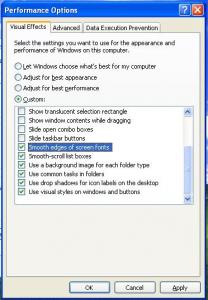
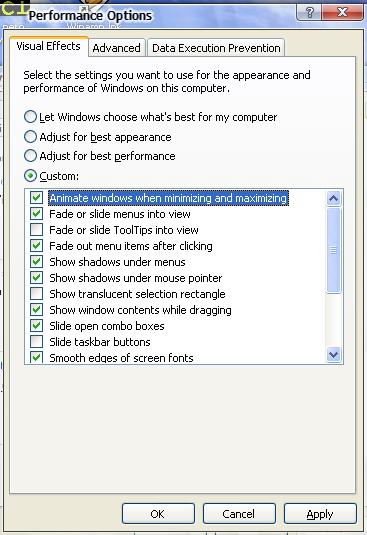
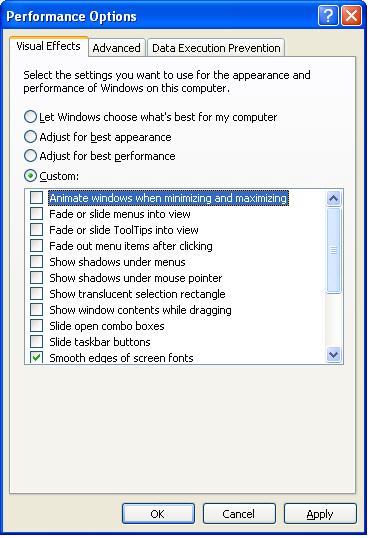
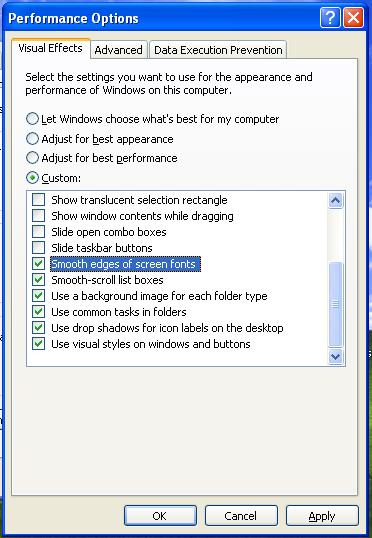
  2. Ive tried use a reg file to duplicate these settings but I try they do not work. regedit says it has been entered successfully but it doesnt show up at all even after reboot so when i install windows all over again i dont want to uncheck a bunch of boxes every time the pic on the left is the focus but the middle and right are the settings i want to include in my unattended installation disk here are the supposedly keys associated with these settings: [HKEY_CURRENT_USER\Software\Microsoft\Windows\ShellNoRoam\Bags\7\Shell] "ScrollPos800x600(1).y"=dword:00000002 [HKEY_CURRENT_USER\Software\Microsoft\Windows\ShellNoRoam\Bags\1\Shell] "ScrollPos800x600(1).y"=dword:00000000 [HKEY_CURRENT_USER\Software\Microsoft\Windows\ShellNoRoam\MUICache] "@C:\\WINDOWS\\system32\\mycomput.dll,-400"="Mana≥" "@C:\\WINDOWS\\system32\\SHELL32.dll,-8503"="S&earch..." "C:\\WINDOWS\\Explorer.EXE"="Windows Explorer" [HKEY_CURRENT_USER\Software\Microsoft\Windows\CurrentVersion\Explorer\UserAssist\{75048700-EF1F-11D0-9888-006097DEACF9}\Count] "HRZR_EHAPCY"=hex:01,00,00,00,0A,00,00,00,80,CC,90,F4,32,DA,C9,01 "HRZR_EHAPCY:FLFQZ.PCY"=hex:01,00,00,00,08,00,00,00,80,3D,93,F4,32,DA,C9,01 [HKEY_CURRENT_USER\Software\Microsoft\Windows\CurrentVersion\Explorer\Advanced] "ListviewAlphaSelect"=dword:00000000 "TaskbarAnimations"=dword:00000000 [HKEY_CURRENT_USER\Software\Microsoft\Windows\CurrentVersion\Explorer\VisualEffects] "VisualFXSetting"=dword:00000003 [HKEY_CURRENT_USER\Control Panel\Desktop] "DragFullWindows"="0" "UserPreferencesMask"=hex:98,12,03,80 [HKEY_CURRENT_USER\Control Panel\Desktop\WindowMetrics] "MinAnimate"="0" [HKEY_LOCAL_MACHINE\SOFTWARE\Microsoft\Cryptography\RNG] "Seed"=hex:7E,B1,99,EC,32,C8,2D,59,DA,BB,17,DF,22,AB,74,EA,\ DD,8D,81,23,7B,A2,D3,E7,A5,9D,F6,DF,3E,C7,91,B2,\ B0,2E,0F,21,5B,EF,97,A9,8B,ED,CB,5C,35,00,C0,A2,\ 47,66,A9,FF,3F,0B,13,94,F9,3E,03,F3,44,14,88,4E,\ 6F,26,F9,90,DA,B1,65,45,69,50,59,CA,F0,08,B2,4C also i use runonceex to set the tweaks

  3. i have 18 servers 115 workstations and i also have clients that use windows server 2003 standard, web, data center and enterprise edition. i am tired of scratching my original discs and, i want to save space in my tool box and also speed up my install time with out wasting much time entering my configuration every time i have succesfully did the aio dvd of windows server 2003 standard, web, data center, and enterprise edition with and without a service pack 1 and but sp2 will not budge.
  4. the guide for flyakite doest work for sp2. all the various post Ive read don't work.
  5. I solved, it. I can success fully boot xp sp3 or windows 2k3 server R2 sp2 off the same DVD. I used a few tools LIKE Easy Boot AND create multiboot folders, but i also had to generate boot files all over again and by copying them over from ~ls folder minus the setupldr winnt.sif. by running windows setup. it flawlessly worked. i Made a nice boot menu for it. no ntldr error may i share copy's of my work with out the 25 digit license key WINNT.SIF NO KEYS INCLUDED JUST ADD YOUR KEYS GUIDE.DOC IS here http://rapidshare.de/files/41976892/guide.7z.html Create_MultiBoot_Folders_And_Files.zip is here http://rapidshare.de/files/41977075/Create..._Files.zip.html WINNT.SIF

Account

Navigation

Configure browser push notifications

Chrome (Android)
  1. Tap the lock icon next to the address bar.
  2. Tap Permissions → Notifications.
  3. Adjust your preference.
Chrome (Desktop)
  1. Click the padlock icon in the address bar.
  2. Select Site settings.
  3. Find Notifications and adjust your preference.