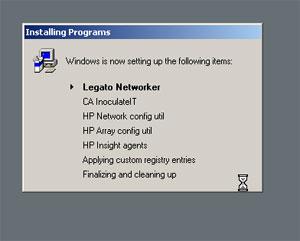
Hi, I've run into a very strange problem, when I run my unattended ISO for Windows 2003 in my virtual enviroment RunOnceEx does what it's supposed todo. This screen shows up, programs installing and everyone is happy. But... when I run then same ISO on a physical server everything is going fine until RunOnceEx... Windows autologon and a gray screen, Programs is installing but the window telling everyone whats going on is just gone. It's a bit frustrating... Can someone help? I've run out of ideas... this is my RunOnceEx.cmd cmdow @ /HID @Echo Off IF EXIST D:\CD.txt SET CDROM=D: IF EXIST E:\CD.txt SET CDROM=E: IF EXIST F:\CD.txt SET CDROM=F: IF EXIST G:\CD.txt SET CDROM=G: SET PP=%cdrom%\Apps\ SET KEY=HKLM\SOFTWARE\Microsoft\Windows\CurrentVersion\RunOnceEx REG ADD %KEY% /V TITLE /D "Installing Programs" /f REG ADD %KEY%\000 /VE /D "Legato Networker" /f REG ADD %KEY%\000 /V 1 /D "%PP%legato\NetWorker.msi /qn" /f REG ADD %KEY%\001 /VE /D "CA InoculateIT" /f REG ADD %KEY%\001 /V 1 /D "\"%PP%CA\eTrust Antivirus.msi\" /qn" /f REG ADD %KEY%\002 /VE /D "HP Network config util" /f REG ADD %KEY%\002 /V 1 /D "%PP%HP\net_conf\cp005319.exe /s" /f REG ADD %KEY%\003 /VE /D "HP Array config util" /f REG ADD %KEY%\003 /V 1 /D "%PP%HP\array_conf\cp005393.exe /s" /f REG ADD %KEY%\004 /VE /D "HP Insight agents" /f REG ADD %KEY%\004 /V 1 /D "%PP%HP\insight_agents\cp005413.exe /s" /f REG ADD %KEY%\005 /VE /D "Applying custom registry entries" /f REG ADD %KEY%\005 /V 1 /D "REGEDIT /s C:\install\nomys.reg" /f REG ADD %KEY%\005 /V 2 /D "REGEDIT /s C:\install\legato.reg" /f REG ADD %KEY%\006 /VE /D "Finalizing and cleaning up" /f REG ADD %KEY%\006 /V 1 /D "C:\install\cleanup.cmd >> C:\Errors.log 2>&1" /f EXIT and this is my WINNT.SIF [Data] Autopartition = 0 MsDosInitiated = 0 UnattendedInstall = Yes OemDrivers = OemInfFiles [Unattended] UnattendMode = FullUnattended UnattendSwitch = Yes OemPreinstall = Yes OemSkipEula = Yes FileSystem = * WaitForReboot = No NoWaitAfterTextMode = 1 NoWaitAfterGUIMode = 1 DriverSigningPolicy = Ignore NonDriverSigningPolicy = Ignore Hibernation = No [OemInfFiles] OemDriverFlags = 1 OemDriverPathName = "%SystemRoot%\nldrv" OemInfName = "ich5core.inf","cpqcidrv.inf","q57win32.inf","cpqcisse.inf","cpqcissm.inf" [GuiUnattended] AutoLogon = Yes AutoLogonCount=1 EncryptedAdminPassword = No AdminPassword = "1234" TimeZone = 110 OEMSkipRegional = 1 OemSkipWelcome = 1 [Shell] DefaultThemesOff = Yes DefaultStartPanelOff = Yes [LicenseFilePrintData] AutoMode = PerSeat [Components] Indexsrv_system = Off [UserData] ProductKey = ComputerName = * FullName = OrgName = [RegionalSettings] Language = 041d [Networking] InstallDefaultComponents = Yes [WindowsFirewall] Profiles = WindowsFirewall.TurnOffFirewall [WindowsFirewall.TurnOffFirewall] Mode = 0 [Identification] JoinWorkgroup = install