Skip to content
View in the app

A better way to browse. Learn more.

MSFN

A full-screen app on your home screen with push notifications, badges and more.

To install this app on iOS and iPadOS
  1. Tap the Share icon in Safari
  2. Scroll the menu and tap Add to Home Screen.
  3. Tap Add in the top-right corner.
To install this app on Android
  1. Tap the 3-dot menu (⋮) in the top-right corner of the browser.
  2. Tap Add to Home screen or Install app.
  3. Confirm by tapping Install.

thujone

Member
  • Joined

  • Last visited

  • Country

    United States
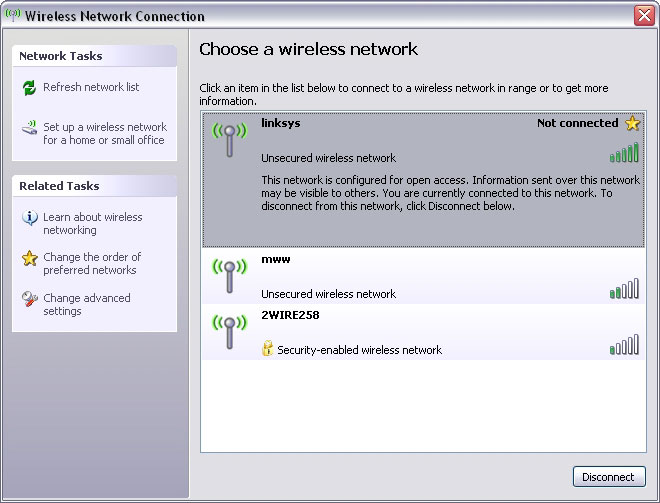
  1. hi, please see attached screenshot. as you can see, the wireless networking panel reports that i am not connected, yet it gives me the option to Disconnect. this does not happen when i first start my computer. it only happens after i lose a connection to a wireless network and then reconnect to it. when i reconnect to it, it doesn't seem to update the status.
  2. hello, i haven't been able to find any info on this issue i have, so hopefully someone here knows. i installed service pack 2 recently. now when i open the Wireless Network Connection window, it _sometimes_ shows the local wireless network status as "Not connected" even when it is connected. I know it's connected, because i am able to use the internet, and the button at the bottom of the window says "Disconnect," which implies that i am actually connected. it's more annoying than anything else, because i can't tell if i'm connected or not by just looking at the system tray. what kind of bug is this? how can i fix it? or please tell me where i can go to learn more about this. thanks much, rich


Account

Navigation

Configure browser push notifications

Chrome (Android)
  1. Tap the lock icon next to the address bar.
  2. Tap Permissions → Notifications.
  3. Adjust your preference.
Chrome (Desktop)
  1. Click the padlock icon in the address bar.
  2. Select Site settings.
  3. Find Notifications and adjust your preference.