Iki
About Iki

Iki's Achievements
0
Reputation
-
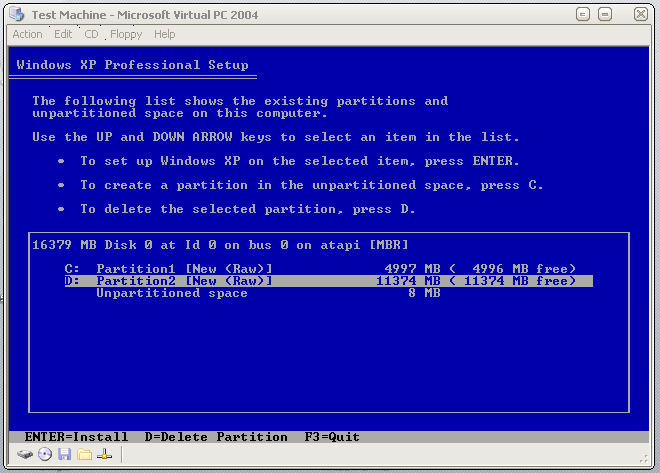
Hmmmm, well i create the partitions (see image)... But find no option at all to format the 2nd partition? I can only delete it or install windows to it, not format it

-
Yes thats how I have it at the moment... But the partition program that comes up, lets you set partitions, but you can only choose to format the partition that you want windows installed on... So the second partition will exist but won't be formatted, so surely applications will fail to install on that partition? Forgive me if im misunderstanding something lol
-
Thanks Gee, this would be what im after I think , aslong as by not completely be unattended you mean in the first step of setting up the partitions, and then the rest fine And erm, would you mind telling me how I would go about doing this? Thanks, Iki
-
Yes I would hope there is something better But looks like booting BartPE and then doing it is gonna have to be the way... As for keeping data on the partitions, im gonna say no wipe it all
-
Thank you for your reply Unfortunatly im not familiar with the winbom.ini and so don't think I could quite do this method lol (Im not some technical guy that works in a company or anything, just doing it for my own personal desire and only started my unattended cd a few days ago lol) The only other idea ive come up with is replacing the boot image of the disk to run my own boot loader, where by i can choose to run a partition program, and THEN run the original setup... Not sure how sucessful I will be with this lol, but it will keep me busy Thanks (any other info/sugestions/ideas very much welcome!), Iki
-
Firstly I apologize if this has already been answered (I tried searching around a bit but didn't find anything) and also if I've posted in the wrong section (although I think im ok ) Thanks to the great info here I have managed to setup a nice unattended xp install, which installs updates, apps etc everything and more that i was hoping The only thing is, is that I like xp installed on one partition... And then my apps installed on another (namely the D drive)... All works fine, apps install to D drive etc all works lovely! However... this is only if i have previously set up the D partition and formatted it... What if I install onto a new drive? The 2nd partition won't exist for one thing so I assume there will be a few errors So I was wondering if anyone has any ideas/suggestions as to how to go about this? ie before the window installed/partitioner kicks in... to set up some partitions? (because as far as i know the windows partitioner can create the partitions, but it won't format the 2nd one)? Any help very much appreicated! Iki.