Skip to content
View in the app

A better way to browse. Learn more.

MSFN

A full-screen app on your home screen with push notifications, badges and more.

To install this app on iOS and iPadOS
  1. Tap the Share icon in Safari
  2. Scroll the menu and tap Add to Home Screen.
  3. Tap Add in the top-right corner.
To install this app on Android
  1. Tap the 3-dot menu (⋮) in the top-right corner of the browser.
  2. Tap Add to Home screen or Install app.
  3. Confirm by tapping Install.

javier.toledo

Member
  • Joined

  • Last visited

  • Country

    Uruguay
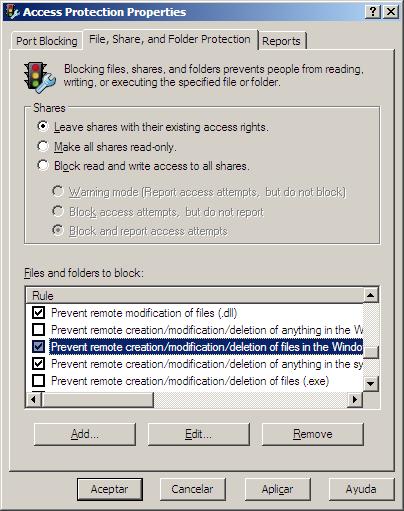
  1. Hi all, First at all, i want to apologize my very poor english. The same problem make crazy for about a few days. The problem is an Access Protection policy of the McAfee antivirus. (i recently installed versión 8.0 of VirusScan Enterprise) You need to open Acces Protection Properties from de VirusScan console and uncheck the item "Prevent remote creation/modification/deletion of files in the Windows folder and subfolders (.ini)". Thats all. I want that tip solve your problem. Regards, Javier Toledo

Account

Navigation

Search

Search

Configure browser push notifications

Chrome (Android)
  1. Tap the lock icon next to the address bar.
  2. Tap Permissions → Notifications.
  3. Adjust your preference.
Chrome (Desktop)
  1. Click the padlock icon in the address bar.
  2. Select Site settings.
  3. Find Notifications and adjust your preference.