theCream
Content Type
Profiles
Forums
Events
Everything posted by theCream
-
Would you know if these are affected by OS: ;Show protected operating system files [HKEY_LOCAL_MACHINE\SOFTWARE\Microsoft\Windows\CurrentVersion\Explorer\Advanced\Folder \SuperHidden] "DefaultValue"=dword:00000000 [HKEY_CURRENT_USER\Software\Microsoft\Windows\CurrentVersion\Explorer\Advanced] "ShowSuperHidden"=dword:00000001 ;Show Hidden Files and Folders [HKEY_CURRENT_USER\Software\Microsoft\Windows\CurrentVersion\Explorer\Advanced] "Hidden"=dword:00000000 ; show file extensions in explorer [HKEY_CURRENT_USER\Software\Microsoft\Windows\CurrentVersion\Explorer\Advanced] "HideFileExt"=dword:00000000 I have been trying to get the above to work in my reg file but they don't seem to stick. I ran the above as just a reg file on the desktop and only the show protected system files was affected. I want to be able to see all files when the system boots. Am I doing something wrong with the above entries or can it only be done after OS setup?
-
WSrv2k3 R2 SP2 Unattended.txt file
theCream replied to Burke's topic in Unattended Windows 2000/XP/2003
I reloaded again last night and tried it again and it was the same result. The actual load of W2K3 Server STD goes fine but when I log in first time it prompts for the second disc. My load is all on one CD not DVD. Also I checked the registry after the fresh load and I see the runonceex and the runonceex10 keys and they have the same info as the runonceex batch file. The cd is still in the drive btw. I am thinking of trying to robocopy the cmpnents folder and then running a batch off of that. I just need to know what is bringing up the prompt for the second disc. -
WSrv2k3 R2 SP2 Unattended.txt file
theCream replied to Burke's topic in Unattended Windows 2000/XP/2003
JuMz, No go. I am thinking back to beginning of this thread that I need to suppress the request for the second CD. Could the Autorun.inf be casuing and issue. When i copied it over I didn't overwrite the file from disc 1. [AutoRun] open=setup.exe icon=setup.exe,0 Should it be the one off of the second disc? BTW I tried running just the RunOnceEx.cmd off of the desktop after it was loaded and it did not work. Just leave it as it is. You don't need any 'EXIT' anywhere. The window will automatically close and exit once it executes everything under [COMMANDS]. By having EXIT in batch.cmd, it forced the command window to close BEFORE executing RunOnceEx.cmd -
WSrv2k3 R2 SP2 Unattended.txt file
theCream replied to Burke's topic in Unattended Windows 2000/XP/2003
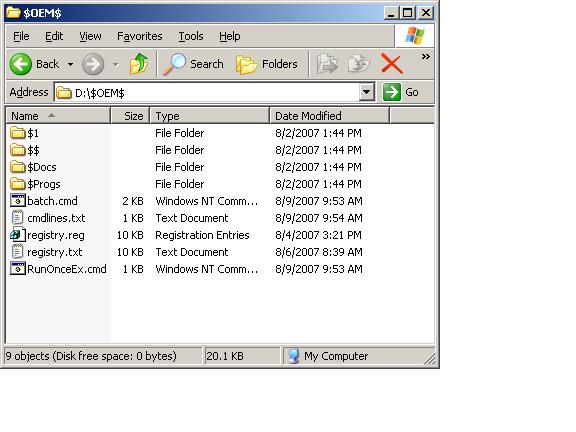
OK, should I put the exit in the RunonceEx or just leave it as is? And yes the file is cmdlines.txt... I attached screenshot or $oem$ also.
-
WSrv2k3 R2 SP2 Unattended.txt file
theCream replied to Burke's topic in Unattended Windows 2000/XP/2003
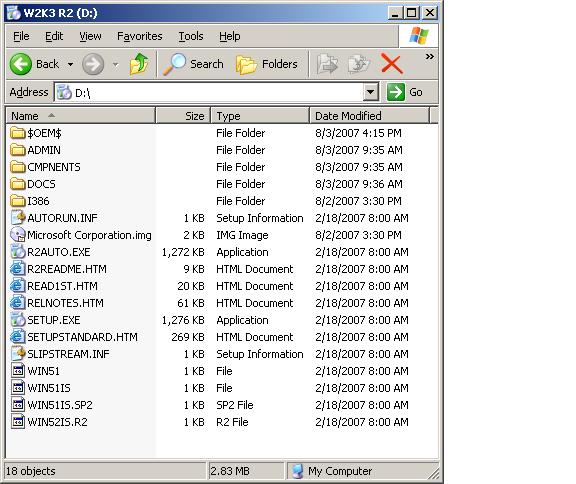
JuMz, Thanks for the response, but unfortunately it did not work. I still think it may be the way i had the batch files set up. My File structure on CD winnt.sif, cmdlines.txt, batch.cmd and RunOnceEx.cmd file below. My install works perfectly. there are no errors but when I log in the first time it is requesting the second disc. I need to stop that from running on startup and i think i can set up the batch then. BTW I am using a W2k3 Volume disc that SP2 already integrated. $OEM$ ADMIN CMPNENTS DOCS I386 AUTORUN.INF Microsoft Corporation.img R2AUTO.EXE R2README.HTM READ1ST.HTM RELNOTES.HTM SETUP.EXE SETUPSTANDARD.HTM SLIPSTREAM.INF WIN51 WIN51IS WIN51IS.SP2 WIN52IS.R2 ;SetupMgrTag [Data] AutoPartition=1 MsDosInitiated="0" UnattendedInstall="Yes" [unattended] UnattendMode=FullUnattended OemSkipEula=Yes OemPreinstall=Yes UnattendSwitch=Yes Hibernation = No TargetPath=\WINDOWS Repartition=No FileSystem=* [GuiUnattended] AdminPassword="admin" EncryptedAdminPassword=NO OEMSkipRegional=1 TimeZone=35 OemSkipWelcome=1 [userData] ProductKey=XXXXXXXXXXXXXXXXXXX FullName="2K3 R2 Server" OrgName="" ComputerName=2k3R2Server [TapiLocation] CountryCode=1 Dialing=Tone AreaCode=631 [branding] BrandIEUsingUnattended=Yes Home_Page=http://www.google.com [Proxy] Proxy_Enable=0 Use_Same_Proxy=1 [LicenseFilePrintData] AutoMode=PerSeat [identification] JoinWorkgroup=WORKGROUP [Networking] InstallDefaultComponents=Yes [Display] BitsPerPel=16 Xresolution=1024 YResolution=768 Vrefresh=70 [FavoritesEx] Title1="Google.url" URL1="http://www.google.com" [WindowsFirewall] Profiles = WindowsFirewall.TurnOffFirewall [WindowsFirewall.TurnOffFirewall] Mode = 0 [shell] DefaultStartPanelOff=Yes DefaultThemesOff=Yes [Components] indexsrv_system=off IEHardenUser=off IEHardenAdmin=off [TerminalServices] AllowConnections = 1 command.txt file [COMMANDS] "REGEDIT /S registry.reg" "batch.cmd" "RunOnceEx.cmd" batch.cmd file CLS @echo off TITLE Windows 2003 SP2 R2 - Unattended Installation ECHO. ECHO Installing Symantec Av Corp 10 ECHO Please wait... start /wait %systemdrive%\install\SAV\sav10.msi /qb RUNLIVEUPDATE=0 REBOOT=REALLYSUPPRESS ECHO. ECHO Installing Winzip 8.1 ECHO Please wait... start /wait %systemdrive%\WinZip\WINZIP32.EXE /noqp /autoinstall @ECHO OFF for %%i in (D E F G H I J K L M N O P Q R S T U V W X Y Z) do if exist %%i:\WIN51 SET cdrom=%%i: robocopy %CDROM%\I386 /MIR /V %SystemDrive%\I386 reg add "HKLM\SOFTWARE\Microsoft\Windows\CurrentVersion\Setup" /v "Installation Sources" /t REG_MULTI_SZ /d "%SystemDrive%\I386" /f reg add "HKLM\SOFTWARE\Microsoft\Windows\CurrentVersion\Setup" /v SourcePath /d %SystemDrive% /f reg add "HKLM\SOFTWARE\Microsoft\Windows\CurrentVersion\Setup" /v ServicePackSourcePath /d %SystemDrive% /f reg add "HKLM\SOFTWARE\Microsoft\Windows NT\CurrentVersion" /v SourcePath /d %SystemDrive%\I386 /f ECHO. ECHO Restarting the PC in 1 minute... shutdown.exe -r -f -t 60 -c "Windows 2003 Server will now restart in 1 minute, this will give enough time for the shortcuts to update and for the shell to fully load before its ready to restart!" ECHO. ECHO Deleting Temp Installation Files... RD /S /Q %systemdrive%\install EXIT RunOnceEx.cmd file @ECHO OFF SET TAGFILE=\CMPNENTS FOR %%i in (c d e f g h i j k l m n o p q r s t u v w x y z) DO IF EXIST "%%i:%TAGFILE%" set CDDRIVE=%%i: SET KEY=HKLM\SOFTWARE\Microsoft\Windows\CurrentVersion\RunOnceEx REG ADD %KEY% /V TITLE /D "Configuring Your System" /f REG ADD %KEY%10 /VE /D "Installing R2" /f REG ADD %KEY%10 /V 1 /D "%CDDRIVE%\cmpnents\r2\setup2.exe /q /a" /f
-
WSrv2k3 R2 SP2 Unattended.txt file
theCream replied to Burke's topic in Unattended Windows 2000/XP/2003
JuMz, I tried using your method and it didn't work. I believe I may have placed the RunOnceEx.cmd in the wrong place or it may be that I also use a batch job in front of the RunonceEx. Could you go into a little more detail as to how you do yours?