Everything posted by APY
-
Thanks for the tip, I'll go with that until (or if) this will be solved
-
Well, before XPize it had a different icon. I further researched this problem and it appears XPize adds a blank "paper" icon, in which it puts the icon of the program the document is opened with. So for a Notepad document, it would look like the picture I attached (and yes, I'm sure it's a text file and it's opened with Notepad), and files for example with UltraEdit (another text editor) have that paper with the UltraEdit icon. Now the problem is (as it seems), that the Notepad icon and UltraEdit icon in those programs aren't transparent, so on your blank paper icon, they show with a white background. I hope you understand the situation, I'm not sure if it's actually easy to fix. Thank you for the explanation about the second problem.
-
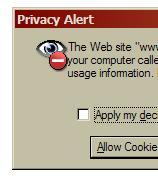
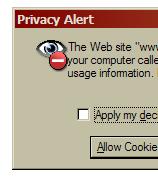
Hi, I downloaded the program yesterday for the first time - awesome work! I really like the replaced icons. I spotted two icons that don't really look right, I attached screenshots. The first icon is the Notepad Document icon. It shows the Notepad icon on a Windows XP document icon. The Notepad icon however, has a white background instead of a transparent. This looks really odd. The other one I spotted is the icon that's used in the Internet Explorer window that warns when a site requests to set a cookie. As you can see in the screenshot, the icon is placed really close to the dialog's text, while there is a large space on the left side of the icon. I could only find a suggestions topic for the new version. The only bug-reporting topic I found was closed. So I'm sorry if this is posted in the wrong place. I hope you can use my report. Edit: d'oh, attachments.