Skip to content
View in the app

A better way to browse. Learn more.

MSFN

A full-screen app on your home screen with push notifications, badges and more.

To install this app on iOS and iPadOS
  1. Tap the Share icon in Safari
  2. Scroll the menu and tap Add to Home Screen.
  3. Tap Add in the top-right corner.
To install this app on Android
  1. Tap the 3-dot menu (⋮) in the top-right corner of the browser.
  2. Tap Add to Home screen or Install app.
  3. Confirm by tapping Install.

jdys_1991

Member
  • Joined

  • Last visited

  • Country

    United Kingdom
  1. THXXXXXXXXXXXX It really works now!!!!!!!! THX for your help!!!!!!!!!!!!!
  2. Ok, Here you go and THX for helping me config.js
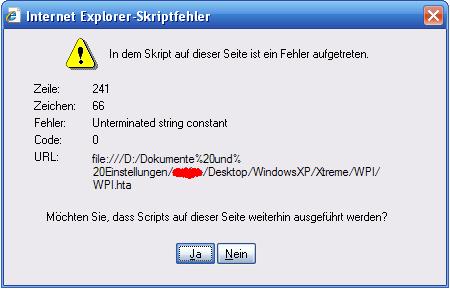
  3. Hi everyone, I have a little problem. I have been starting making my XP unattended cd, but when it was time to set up WPI i get and error. But why? (The error is on the screenshot) When i started configurating the wpi config.js file via the wpi, i keept checking for any errors by closing and re-opening wpi. (Just to make sure ) There was no problem until i added CDRW!N (The 16th Program) into the config.js. When i click on Yes or No button nothing apperars, everything is vanished. BUT WHY...? Please help me! THX (Hope you understood my problem )

  4. PLZZZ GUYYsssss I really need this setup exe file!!!!!!!!! Pleease someone upload it somewhere else!!!!!! PLEASE!!!! THX very much
  5. Hi nfiniteFX I really like your Setup !!! PLeASE CouLD YOU UPLOAD IT SOMEWHERE ELSE!!!!!!!! The current download link doesn't download the file ?!?! PLEASE !!!!!!!!!!! I think it's awsome !!! THX

Account

Navigation

Configure browser push notifications

Chrome (Android)
  1. Tap the lock icon next to the address bar.
  2. Tap Permissions → Notifications.
  3. Adjust your preference.
Chrome (Desktop)
  1. Click the padlock icon in the address bar.
  2. Select Site settings.
  3. Find Notifications and adjust your preference.