-
hi soulin, but how to add it, without stopping the installation?
-
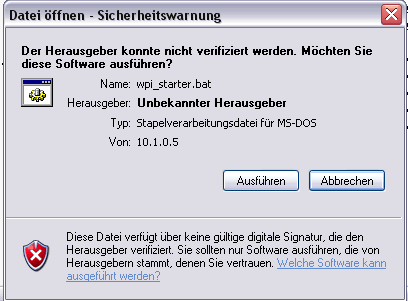
Hi every1, Is there a way to disable the following security message for .bat Files? Let me explain: I want to start 2 .bat Files after a unattended isntallation fo WInXP Pro. The problem is, that after the automatically login of the admin it comes this message and the whole installation stops. In the attachment u can c what I mean. Thanks
-
thx for this answer. I like Real VNC a bit more than thigt VNC. Can anyone tell me a way at realvnc? Thx
-
thx this answer is clear. -> could be closed(if this is usual here)
-
Hi folks, just a little question, if I configure the setupmgr.exe to create a .SIF file - i come to the following point: Administrator Password. there I am able to set the Password for the local administrator. After this field there i can choose the option if the password should be crypted or not. Until here everythins is clear. The next option is automatically logon from the Admin and theres a counter.....what does this counter mean - whats the difference between setting it to 1 or setting it to 10. thanks
-
Hi every1, this is my first posting in this great forum. I hope my english is good enough to ask you some questions. I made an unattended WinXP installation with help from this site. I did it with setupmgr.exe and WPI. My Question now is: Is there any possibilty to get a password set in Real VNC 4.0 for an uttattended installation? I search about 2 days here for a switch but i didn't found one. If anyone could give me a hint or a solution, this would be very nice. Thx in advance Schlecky