-
I have this broadband set up and working. I place a shortcut in the startup folder, when each time XP starts, broadband connects itself as well. Now I want broadband to automatically connect at some other specific time, so I configure a schedule pointing to the shortcut. Though schedule reports successful execution, broadband is never connected. What's the correct method to do that?
-
MS-6385 has nothing to do with C-Media. It doesn't have C-Media chip so C-Media drivers won't make onboard audio work. The string "C-Media AC97 Audio Device" that Belarc Advisor displays is but a result of such drivers installed. Those drivers should be removed. MS-6385 has Intel 850 and ICH2 chipsets. ICH2 has an AC'97 compliant audio controller, supported in Windows 98SE/2K/ME/XP/2K3 by applying the 850 chipset INF Update Utility. The latest provided by Microstar at http://us-download.msi.com.tw/support/dvr_...el_inf_OM71.zip is equivalent to Intel version 6.2.1.1001 released 7/26/2004. Yet Intel is providing a newer version 6.3.0.1007 released 12/16/2004 at ftp://aiedownload.intel.com/df-support/81...infinst_enu.exe. Run Belarc Advisor again after applying the INF Update Utility to see what audio device it displays.
-
Thanks! Same subnet and workgroup, and pings loopback fine.
-
Thanks! I believe I have correct NIC drivers, and I do reinstall sp6a after every move. Box #4 has onboard Intel PRO100+ Management Adapter, and I fed it with Intel's latest driver v9.2, and in NT4 Intel's diagnosis shows PASS for all items. Actually I also tried several other add-on NICs including Intel, 3Com, Dlink, Realtek, with latest version drivers, all worked well in XP and 98SE but not NT4.
-
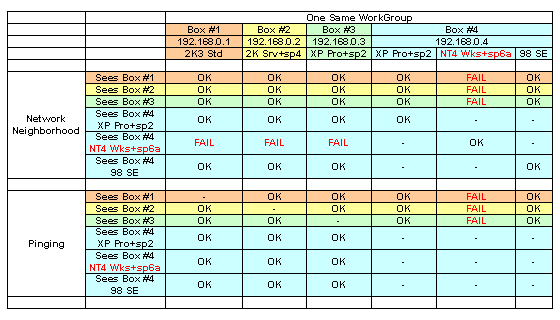
I have 3 pretty standard WIntel boxes, plus a newly setup multi-boot #4 with 3 OSes, all connected via ethernet switch by TCP/IP to operate under one same workgroup. Booted in 98 SE or XP Pro+sp2, Box #4 Network Neighborhood sees all 3 others, and vice versa, and data transfers perfectly between all. However, booted in NT4 Wks+sp6a, Box #4 Network Neighborhood sees none of the 3 others, and vice versa, thereby data can't transfer between Box #4 and any other. Also, booted in NT4 Wks+sp6a, Box #4 fails to ping any of the other 3 boxes, whilst on the contrary all 3 others succeed in pinging Box #4. Where does the problem possibly lie? Any directions will be highly appreciated. TIA!