

Everything posted by Miraak
-
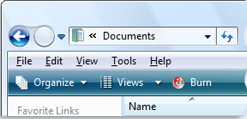
Hey, As you may know, in windows vista the explorer command bar display icons, wich make it look way better and friendlier than the W7 one, wich only display text Originally i thought it was part of the theme files but i was wrong, i suppose it's part of explorer.exe or maybe stuff like shell32.dll Does anybody know if restoring those icons is possible ? (using tools like resource hacker or similar) maybe @win32 ? thx all
-
Hey, i am a long time W7 user but i also rly liked vista before, i saw there was alot of progress made by the extended kernel team so i might try vista again soon (at least on my secondary computer) im quite used to features such as aero peek/snap and other more W7 stuff but i am sure i could manage fine or find the third party alternative But i would like to know what are the "hidden"/unintended changes between W7 and vista; what i mean by "hidden" are changes that are not already listed or intended by microsoft For exemple i read on this forum that the D3D/DirectX render quality was diffrent between the two OS, any other differences like that ? Thx
