Skip to content
View in the app

A better way to browse. Learn more.

MSFN

A full-screen app on your home screen with push notifications, badges and more.

To install this app on iOS and iPadOS
  1. Tap the Share icon in Safari
  2. Scroll the menu and tap Add to Home Screen.
  3. Tap Add in the top-right corner.
To install this app on Android
  1. Tap the 3-dot menu (⋮) in the top-right corner of the browser.
  2. Tap Add to Home screen or Install app.
  3. Confirm by tapping Install.

Iuri Bezerra

Member
  • Joined

  • Last visited

  • Country

    Brazil
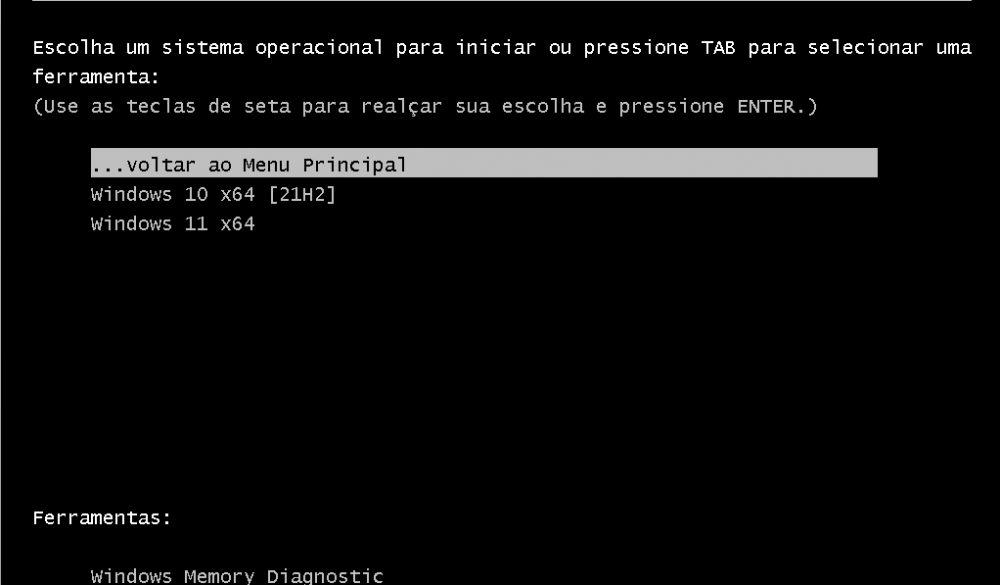
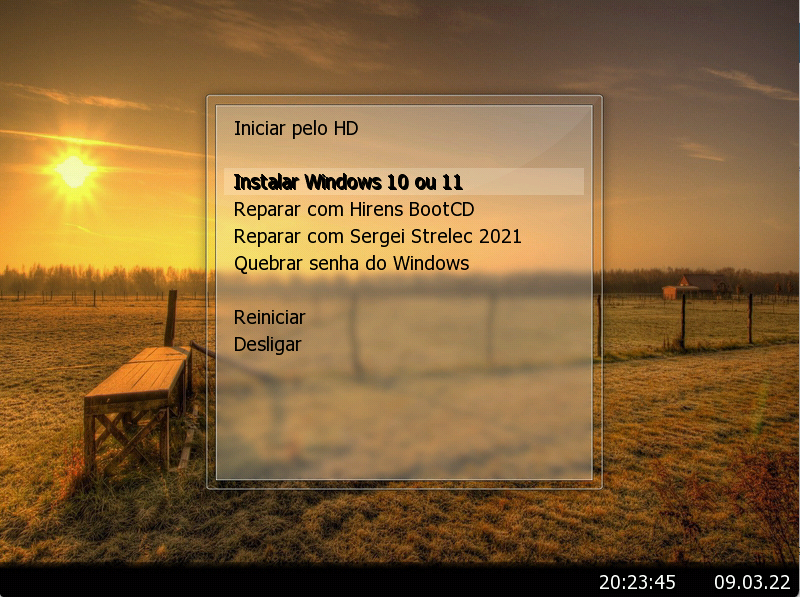
  1. Olá amigos, sou brasileiro, e espero que traduzam minha mensagem. Quero personalizar ao máximo meu Pendrive multiboot, porém estou com dificuldade em personalizar essa parte: Alguém tem alguma SOLUÇÃO para eu colocar um wallpaper no fundo, ou algo mais bonito? OBS: Queria da forma como conseguir na parte do Menu Principal:
Account

Navigation

Search

Search

Configure browser push notifications

Chrome (Android)
  1. Tap the lock icon next to the address bar.
  2. Tap Permissions → Notifications.
  3. Adjust your preference.
Chrome (Desktop)
  1. Click the padlock icon in the address bar.
  2. Select Site settings.
  3. Find Notifications and adjust your preference.