




-
Hi Sir, Thanks for the code. I tested in my computer it works very well. But as you I have to test it on VMWare. So is there any chance to do it in VMWare? In my opinion I think I should use list disk for displaying all the disk in VMWare, after displaying the disks I have to use diskpart command. I have a few problem to solve Checking the script in VMware, use the list disk command and the action of Diskpart.
-
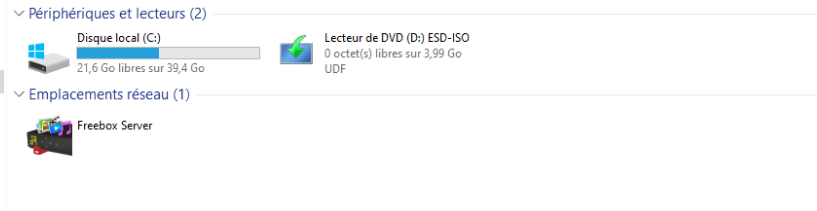
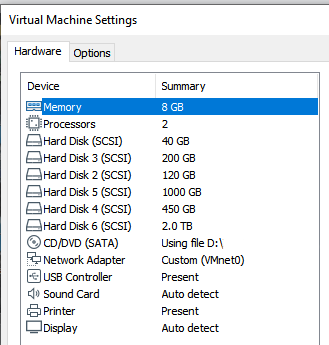
Hi, OK thank you. Here's the code inside the 120.txt file select disk 1 clean creat part prim size=2048 select part 1 format fs=ntfs quick label=SYSTEME active creat part prim select part 2 format fs=ntfs quick label=DATA list part exit) > c:/Project/120a.txt And this the code inside the 200.txt which similar to 120.txt file. select disk 1 clean creat part prim size=2048 select part 1 format fs=ntfs quick label=SYSTEME active creat part prim select part 2 format fs=ntfs quick label=DATA list part exit) > c:/Project/200a.txt As I said both are working well, but no drive displayed on Windows. As you can see in VmWare I have the 5 disks ready (Hard disk 3, Hard disk 2, Hard disk 5, Hard disk 4, Hard disk 6)
-
Hi, I tested this code: @echo off setlocal enabledelayedexpansion :debut cls ECHO *-*-*-*-*-*-*-*-*-*-*-*-*-*-*-*-*-*-*-*-*-*-*-*-*-*-*-*-*-*-*-* ECHO "DISK CAPACITY AVAILABLE" ECHO *-*-*-*-*-*-*-*-*-*-*-*-*-*-*-*-*-*-*-*-*-*-*-*-*-*-*-*-*-*-*-* ECHO * * ECHO * "TYPE 1 FOR 120 GB" * ECHO * "TYPE 2 FOR 200 GB" * ECHO * "TYPE 3 FOR 450 GB" * ECHO * "TYPE 4 FOR 1 TB" * ECHO * "TYPE 5 FOR 2 TB" * ECHO * * ECHO *-*-*-*-*-*-*-*-*-*-*-*-*-*-*-*-*-*-*-*-*-*-*-*-*-*-*-*-*-*-*-* SET /p choice="Choose your disk: " ECHO *-*-*-*-*-*-*-*-*-*-*-*-*-*-*-*-*-*-*-*-*-*-*-*-*-*-*-*-*-*-*-* IF !choice!==1 ( set capacity="120 GB" echo "you have choose: !capacity!" diskpart /s c:/Project/120.txt pause ) else ( IF !choice!==2 ( set capacity="200 GB" echo "you have choose: !capacity!" diskpart /s x:/diskpart/200.txt ) else ( IF !choice!==3 ( set capacity="450 GB" echo "you have choose: !capacity!" diskpart /s x:/diskpart/450.txt ) else ( IF !choice!==4 ( set capacity="1 TB" echo "you have choose: !capacity!" diskpart /s x:/diskpart/1000.txt ) else ( IF !choice!==5 ( set capacity="2 TB" echo "you have choose: !capacity!" diskpart /s x:/diskpart/2000.txt ) else ( set capacity="NON REFERENCE" echo "NON REFERENCE" pause goto debut ) ) ) ) ) I tested on VmWare. I created 5 hard disk. After executing this script, Diskpart works very well for Disk 1. But the disk initialized by diskpart is not displaying on the screen. I don't understand why.
-
Hi, 1) having the whole batch written by some member of the board It would be great if some member of the board write the whole batch, but I don't want to do in this way. or: 2) ask for a code snippet here or there to solve a specific problem you encounter It 's better in this way, I already had some snippets of the command and need some explanation for starting, then with the help of the member of the board I can learn the way to build and some command line. or: 3) advice on what approach and tools are better/more suitable Actually I should use Notepad++ for writing the entire batch file. So I am working on it and I will send it as soon as possible. Thanks a lot
-
Hi, My project is how to create a batch file with a boot menu offering the possibility of installing the following operating system at the user's choice: Windows 10 alone or Windows 10 with preinstalled applications. A menu will allow the user of this medium to choose his hard disk from the disks installed on the workstation. The following disks may be encountered: 120 GB, 200 GB, 450 GB, 1 TB and 2 TB. Among the intern's workstation applications we have: Vmware, Teamviewer, Vnc, Camtasia, Acrobatpdf. Is it possible to any help to build it? Regards, Shindenryu