Skip to content
View in the app

A better way to browse. Learn more.

MSFN

A full-screen app on your home screen with push notifications, badges and more.

To install this app on iOS and iPadOS
  1. Tap the Share icon in Safari
  2. Scroll the menu and tap Add to Home Screen.
  3. Tap Add in the top-right corner.
To install this app on Android
  1. Tap the 3-dot menu (⋮) in the top-right corner of the browser.
  2. Tap Add to Home screen or Install app.
  3. Confirm by tapping Install.

k_raastad

Member
  • Joined

  • Last visited

  • Country

    Norway
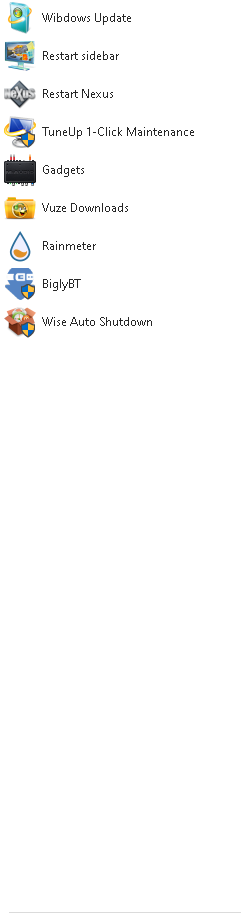
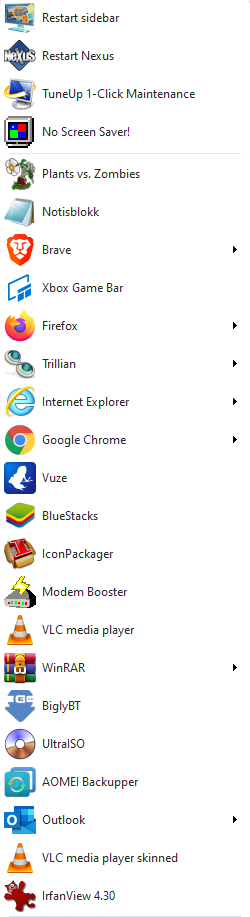
  1. I have experienced this many times, but now I wonder, is there any way to reset this error? my startisback got "ruined" and I dont know why or how to solve it, the recent items panel is gone, and it just happened, tried reinstalling the app, but that wont fix it :S is there any solid sollution to this? if any other knows what this is etc... (a) one pic is of my desktop with the error, and other is from my laptop without the error! different shortcuts cuz different computer and different needs o them really would like to get it back, the top pic is with "error", and the lower is the working one =P

Account

Navigation

Search

Search

Configure browser push notifications

Chrome (Android)
  1. Tap the lock icon next to the address bar.
  2. Tap Permissions → Notifications.
  3. Adjust your preference.
Chrome (Desktop)
  1. Click the padlock icon in the address bar.
  2. Select Site settings.
  3. Find Notifications and adjust your preference.