Skip to content
View in the app

A better way to browse. Learn more.

MSFN

A full-screen app on your home screen with push notifications, badges and more.

To install this app on iOS and iPadOS
  1. Tap the Share icon in Safari
  2. Scroll the menu and tap Add to Home Screen.
  3. Tap Add in the top-right corner.
To install this app on Android
  1. Tap the 3-dot menu (⋮) in the top-right corner of the browser.
  2. Tap Add to Home screen or Install app.
  3. Confirm by tapping Install.

Phenix

Member
  • Joined

  • Last visited

  • Country

    France
  1. ok thanks bigmuscle, so i think i should not using this software .... if i refer to the guide to quote it " Can anyone install this software on his computer? This library is intended for advanced users only. If you are a beginner and you do not have deeper knowledge of Windows (such as registry editing etc.) you should not install this software... " thx anyways for helping a beginner who tried to get a cool looking windows. Sry for asking.
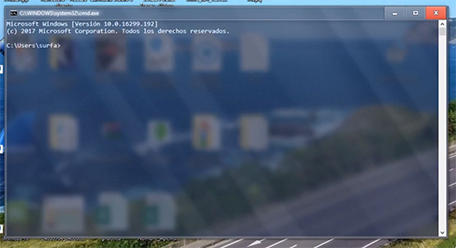
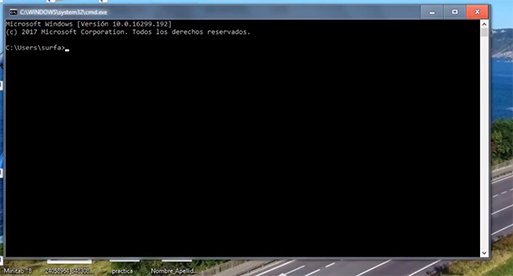
  2. hi i got a question about aero glass , i found about this program not long ago so far really like the idea, but i'm wondering does it add glassy look only to the top bar and border or can we make explorer windows or else completly glassy ? because i saw a video on youtube about aero glass and so tried the free version but i only got like the 1st picture with just the border and top bar glass but the one completly glassy i can't find how to get it ? is it only for the paid version or i'm missing something ? i'm on win 10 1709 v16299 , ( the screenshot are from the video i saw on youtube )


Account

Navigation

Configure browser push notifications

Chrome (Android)
  1. Tap the lock icon next to the address bar.
  2. Tap Permissions → Notifications.
  3. Adjust your preference.
Chrome (Desktop)
  1. Click the padlock icon in the address bar.
  2. Select Site settings.
  3. Find Notifications and adjust your preference.