Skip to content
View in the app

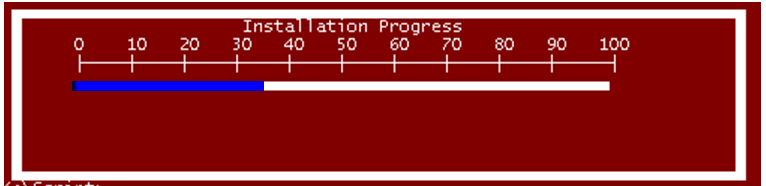
A better way to browse. Learn more.

MSFN

A full-screen app on your home screen with push notifications, badges and more.

To install this app on iOS and iPadOS
  1. Tap the Share icon in Safari
  2. Scroll the menu and tap Add to Home Screen.
  3. Tap Add in the top-right corner.
To install this app on Android
  1. Tap the 3-dot menu (⋮) in the top-right corner of the browser.
  2. Tap Add to Home screen or Install app.
  3. Confirm by tapping Install.

StenioL

Member
  • Joined

  • Last visited

  • Country

    Brazil
  1. Many thanks for your support. In fact I do not really know how to put together a decent script, I have the humility to recognize that. Scripts are rather a lot of pieces that in practice do not work. I will continue studying and researching for later able to develop a less bad code I want to thank you immensely your support and patience. StenioL
  2. Yeah In first post that image ..I want create this status bar in my script The problem is: I DON´T KNOW what error....Sorry... Explain is...First place is Only to Elevate USER that run CMD ...Second place is Progress BAR Error is about theses lines: I use REM to test... the real command is WUSA.EXE %%F /NORESTART /QUIET ------------------------------- REM ECHO ABOVE IS echo %%F rem MY COMMAND´S IS HERE REM WUSA.EXE %%F /norestart /quiet ----------------------------------- @ECHO OFF SETLOCAL ENABLEEXTENSIONS ENABLEDELAYEDEXPANSION :: BatchGotAdmin ::------------------------------------- REM --> Check for permissions >nul 2>&1 "%SYSTEMROOT%\system32\cacls.exe" "%SYSTEMROOT%\system32\config\system" REM --> If error flag set, we do not have admin. if '%errorlevel%' NEQ '0' ( echo Requesting administrative privileges... goto UACPrompt ) else ( goto gotAdmin ) :UACPrompt echo Set UAC = CreateObject^("Shell.Application"^) > "%temp%\getadmin.vbs" set params = %*:"="" echo UAC.ShellExecute "cmd.exe", "/c %~s0 %params%", "", "runas", 1 >> "%temp%\getadmin.vbs" "%temp%\getadmin.vbs" del "%temp%\getadmin.vbs" exit /B :gotAdmin pushd "%CD%" CD /D "%~dp0" :: rem @ECHO OFF FOR /F "TOKENS=*" %%F IN ('dir /b *.msu') DO ( REM ECHO ABOVE IS echo %%F rem MY COMMAND´S IS HERE REM WUSA.EXE %%F /norestart /quiet CALL :_update_statusbar ) :_update_statusbar color 0f set load= set/a loadnum=0 :loading set load=%load%Û cls ECHO. ECHO. ECHO. ECHO ÜÜÜÜÜÜÜÜÜÜÜÜÜÜÜÜÜÜÜÜÜÜÜÜÜÜÜÜÜÜÜÜÜÜÜÜÜÜÜÜÜÜÜÜÜÜÜÜÜÜÜÜÜÜÜÜÜÜÜÜÜÜÜÜÜÜÜÜÜÜ echo Û Û echo Û Installation Progress Û echo Û 0 10 20 30 40 50 60 70 80 90 100 Û echo Û ÃÄÄÄÄÅÄÄÄÄÅÄÄÄÄÅÄÄÄÄÅÄÄÄÄÅÄÄÄÄÅÄÄÄÄÅÄÄÄÄÅÄÄÄÄÅÄÄÄÄÄ´ Û echo Û %load% echo Û %load% echo Û Û echo Û Û ECHO ÛÜÜÜÜÜÜÜÜÜÜÜÜÜÜÜÜÜÜÜÜÜÜÜÜÜÜÜÜÜÜÜÜÜÜÜÜÜÜÜÜÜÜÜÜÜÜÜÜÜÜÜÜÜÜÜÜÜÜÜÜÜÜÜÜÜÜÜÜÛ timeout /t 1 >nul set/a loadnum=%loadnum% +1 if %loadnum%==15 goto Done goto loading :Done echo. rem pause rem *your action here* rem pause exit GOTO EOF :EOF

  3. Can you seen attached? I´m trying mount this status bar. Thanks a lot.
  4. Hello everyone, I would like to support to improve a batch script. My script is basically a loop-FOR as below and would like to add a progress bar. I researched a lot about progress bars, but basically all use a loop-FOR in the other and my script is use For-loop Too. I do not know how to put my loop within the progress bar examples Note: Sorry for my english following examples ------------------------------------------- @ECHO OFF FOR /F "TOKENS=*" %%F IN (Patchs.TXT) DO DISM /online /add-package /packagepath:%%F /quiet /norestart eCHO finished PAUSE >NUL ---------------------------------------------- Would like add only status bar in my script Thank you in advance Stenio L

Account

Navigation

Configure browser push notifications

Chrome (Android)
  1. Tap the lock icon next to the address bar.
  2. Tap Permissions → Notifications.
  3. Adjust your preference.
Chrome (Desktop)
  1. Click the padlock icon in the address bar.
  2. Select Site settings.
  3. Find Notifications and adjust your preference.