Everything posted by coscongr
-
Could you be more specific? An example perhaps? A suggestion?
-
Do you know any known pstn modem that supports windows 64bit? I firstly checked for drivers on the support section of their sites but i nothing mentioned there.
-
You are soooooo right! There is that limitation and everything now is working! thank a lot benners!
-
I am sorry but i have already done this. I have not a spear pc to try a copy of my project but on the VirtualMachine my iso is not bootable. I don't have any particular knowledge about bootable cd's and dvd's and obviously i am missing of something. I even tryed on CDImageGui to clik on the "y2 round directory sizes to multiples of 2K (6.8.1.3)" into the Test tab but nothing different.
-
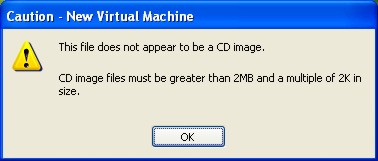
I can not make my unattended dvd bootable (checked by VirtualMachine). I used Isobuster to get the "Microsoft Corporation.img" and then by using Nero i choosed the option "DVD-Rom(Boot)". When i "Capture Iso Image" with VirtualMachine, i get the same messege! When i mount the Iso to a virtual drive (Alcohol120%) and then "Use Physical Drive" (VirtualMachine) the whole proccess is working right. My unattended DVD is about 3GB (for the time being). I even used "cdimagegui.exe" as "MSFN's Unattended XPCD guide" says but nothing. The funny thing is that my previous project worked perfectly without any boot problems.
-
A little late but i'm back To whom ever concidered thanks to RoqueSpear i found the NirCmd Did great job to me. For closing all your Explorer windows (My Computer, folders, and so on) the command on Start/Run will be: nircmd.exe win close class "CabinetWClass"
-
By the way, is there any other switch that I could use in order to avoid that pop up window of explorer.exe? I mean beside the switches I’ve already used /SP- /SILENT anything more…? Am I stuck here with that window? You see I took a look of AutoIt and ooops! what is all that? I don’t have any experience of that, so I can not take an action!
-
I already knew about Pskill but... when i use "pskill.exe -t NLT4Of~1.exe" /f or "pskill.exe -t NLT4OfficeXP.exe" nothing happens when i use "pskill.exe -t explorer.exe" /f it works but the unattended installation process STOPS. WHAT I NEED: examples or the command line to pskill that folder which opens right after my programm installation (named:NLT4OfficeXp) as i said i thing it is very simple but i can't figure it out.
-
Great forum guys! This is my first post and it is about the way to close a window that opens exactly after the istallation of a speller+hyphenator! I managed the installation switches but in the end a folder named NLT4OfficeXP is been created on the desktop and opens (as a simple window)! I cant find the right way to close that window! It seems easy but i have not the experience to use the taskill! Suppose you had a FOLDER (any folder not the explorer) on the desktop, double click it and then... how you close it? I am working on RunOnceEx and i used this: REG ADD %KEY%\020 /VE /D "Greek Speller for Office 2003" /f REG ADD %KEY%\020 /V 1 /D "%PP%greekspeller\NLT4OfficeXPW.exe /SP- /SILENT "f REG ADD %KEY%\020 /V 2 /D "taskkill /IM NLT4OfficeXP" /f Thanks in advance!