NorthAzimuth
Content Type
Profiles
Forums
Events
Everything posted by NorthAzimuth
-
Unofficial SP 5.2 for Microsoft Windows 2000 (WIP)
NorthAzimuth replied to tomasz86's topic in Hotstream
Thanks so much for the help Tomasz, It was an app!! - installed in Firefox called thumbnail_zoom_plus-3.7-sm+fx.xpi (I would have never thought of it!) After you mentioned an app, i got to thinking of what was interfacing with my mouse cursor? This app had auto updated about two week ago without realizing that i did not have auto update in FF unselected. Obviously it was the recent update that was causing the issue because this app has been in Firefox for quite some time. I installed FF12.0 with bookmarks, and went straight to e-bay check out and it worked just fine!! I am now running FF37.1 and FF46.1 portable on a small slave. (Just on the whole, when i booted up FF46.1 portable it would not work either in e-bay transaction page. It must somehow? interface with some FF37.1 desktop files? (as It was still in when i tried it.) I got to learn some new things this week! I was curious about your comments in regards to the rollups and was wondering if there were more current versions of these? and am i to understand that i need only to install v11 and 5.1? (I'm thinking about reformatting a fresh boot next week.) Where can i find the latest versions? I had read in one of your previous posts that you are doing some storage cleaning? Win2K Unofficial Rollup - v11-d20130616-x86-ENU Windows2000 - UpdateRollup-2-x86-ENU v 5.5.31.0 Win2K Unofficial Rollup SP-5.1 v 5.5.31.0 Thanks in advance for all the help -
Unofficial SP 5.2 for Microsoft Windows 2000 (WIP)
NorthAzimuth replied to tomasz86's topic in Hotstream
Ok, I removed Firefox along with Thunderbird, cleaned up my hard drive then reinstalled everything up to FF 35.1 - nothing in e-bay changed. I downloaded and mounted FF 46.0.1 portable to a small slave drive and logged into my e-bay account and it still did not change my ability to process a transaction. . A transparent box should appear in the page center, which merges with PayPal to complete the financial process, nothing on this transaction page works except when I upgrade from FF35.1 to FF36.1 - FF37.1, i can then select method of payment but when i click the submit button i get "NO" hover icon or striked out zero. It is as if all those functions are disabled from being used. Maneuvering throughout e-bay or PayPal, no problems, everything seems perfectly normal, business as usual. Just on the whole, e-bay's customer service suggested this morning to try a different browser like Google Chrome. I had just used e-bay's checkout like 3 weeks ago without a single problem. Windows 2000 Professional Internet Explorer 6 Windows 2000 Service Pack 4 Unofficial Updates Rollup v11 [daily 20130616] Unofficial Updates Rollup 2 Unofficial Service Pack 5.1 Adobe Flash player 21.0.0.213 Firefox 37.0.2 Thanks in advance for all the help -
Unofficial SP 5.2 for Microsoft Windows 2000 (WIP)
NorthAzimuth replied to tomasz86's topic in Hotstream
(At the moment all i can do is jump in here midstream conversation.) I had inquired, i believe back on previous page 33 or 34 about updating Firefox 35.1. When i try to Go to Page# the search feature freezes. I disabled the hardware acceleration in FF35.1 to keep from crashing as Tomasz had suggested, and 37.1 loaded in just fine however, even here on the MSFN topic board i am having some difficulty in navigating and searching various segments with FF 37.1. I am finding that Javascript may be the possible difficulty and that Java 7 Update 79 was the last release for WinXp. Currently Java 8 Update 91 is the latest update however i cannot get it to update. Is there a work around solution for this? At the moment i am trying to complete a current e-bay transaction and i'm dead in the water trying to go through the e-bay checkout system that interfaces with paypal. Thanks in advance. -
Unofficial SP 5.2 for Microsoft Windows 2000 (WIP)
NorthAzimuth replied to tomasz86's topic in Hotstream
Question, I am currently running Unofficial Updates Rollup 5.1 with Firefox 35.1. I can get Firefox 36.1 to load in fine, but every time i try to open it it crashes and boots up the crash reporter. Can anyone give me a suggestion on what to do? Thanks in advance -
Networking My 2 Abit Windows 2000 Computers
NorthAzimuth replied to NorthAzimuth's topic in Windows 2000/2003/NT4
jalcaz, with 14,437 posts, i'm not quite sure how i want to interpret your response back. I'm not familiar with crystal balls , thingies or power line adapters for information transfer. I was thinking of a pair of Ethernet cards and 17 meters of RJ45 cable from my back office to shop -
Could someone help me connect my two Windows 2000 Computers? I am not sure what i need but this is what i have and what i would like to achieve. I have two identical twin W2K, Abit mobo, Seagate scsi drive machines w/ 56k modems. One is in my office and one is out in my shop. I would like to access one machine from either location and also like to file transfer / storage. My primary goal is to use the shops computer as a file storage vault where it is secure and locked, transferring my office work out to the shops slave drive. Basic ideas are running a split primary drive in the office, being the logical slave portion as a temporary work space and when finished, those file(s) will be sent out to the shops computer for safe keeping. That way there is never any kind of intellectual / personal information ever stored on the office computer. Basically the only information on the office machine are std. Windows files and various software(s). (My house has been broken into once already) I am remodeling at the moment so what ever wires need to be chased through the attic etc... This is fairly old technology so i would assume that it should not be all that expensive project? Thanks in advance for all the help.
-
Thank-You to everyone for their help on this. After spending countless hours of being ran around on the internet , down rabbit holes and wild goose chases, the endless sea of $$~PayPal~$$ conversion tools being offered, inclusive to not having anything that i need, i hit my brick wall of frustration. From $9.95 - $499.00 What is it with M$ and every time they come out with a new OS, out comes a new word processor file extension and without the option to batch convert old M$ files? Even if it meant doing it off their website? My foregone conclusion is , apparently it just isn’t in their nature, so why hassle it. I made the corporate decision back here in the bedroom office and that was to download Apache Open Office 3.3 150mb from oldapps.com. and to completely change my entire word processing system. It has a batch conversion wizard to convert old .doc files into new .odt files. In other words it gives to me , the complete authoritative ownership back over all my hard work. It converted the old M$ .doc files extremely neat and clean , within 99.2% accuracy. After doing a random sampling in 500 files, a minor word blemish here or there, and i mean nothing to get in a twist over. It seems it will only convert M$ .doc, Power Point and Excel in batch, no .rtf files, it won’t recognize them.. As a single file, an .rtf that was created in Windows 2000 Professional,can be opened, then "saved As" singularly as a new .odt just fine. So now my file system consists of both 500 + .rtf files that still need to be batch converted and all the newly converted .odt files. At least i can read everything now, it is all unscrambled and unified.. It’s a reverse dilemma now of needing a converter for changing .rtf to .doc, just the reverse of this original post, so that they too, can be batch converted to .odt in Apache Open Office and everything will be ran under a single umbrella word processor that I the author maintain control over in my computing environment. If i need to send a file to someone, it’s as simple as "save As" to another file extension and send it out.. I can still use Notedpad if I wish for a simple everyday writer, and when I am finished with it, open the newly created .rtf in Apache Open Office and “save As” .odt and discard the original document, a much wider margin of flexibility is there without being dependent on M$ redundancy. I like this Apache, it is more powerful than I need at the moment, but one never knows when a tool like this will come in handy. It has its own .PDF document creator amongst many other tools which means that I don’t have to install .PDF Creator anymore and it’s natural desire to install “other things” if your not careful whilst loading it. If anyone knows of a batch converter from .rtf to .doc, it would be gratefully appreciated !! Once again Thank-you for your time and suggestions.
-
Hello, could someone please lead me in the right direction or explain how i can convert my old Windows 98 .doc files into the .rtf file extension found in Windows 2000. I have about 500 old .doc files that need to be batch converted. They are simple files, letters, notes, documnetation etc. written in Windows 98 Wordpad. I have spent hours searching the internet for a free converter and come up with nothing. I am running the un-official rollups in Windows 2000 Pro and so once that is installed the old .doc fles get all wierd full of additional hex information at the top and bottom of the page mostly. Anyway , i would just like to get everything converted over cleanly and neatly after doing a fresh boot without the rollup(s) and get my system completely updated to the .rtf format. ( Iv`e been using WordViewer as a temp go between so that i can read and view my old work ) Thanks in advance, NorthAzimuth
-
Firefox Setup 16.0.2--Win2K--Rollup issues
NorthAzimuth replied to NorthAzimuth's topic in Windows 2000/2003/NT4
Thanks Tomasz86 , guess i`m sleep at the wheel here , to many long hours. I found it and ran it , loaded fine and when i booted my computer back up i got an error message before Administrator log-on loaded. Windows2000-UURollup-v11-d20130616-x86-ENU.7z. ( Powered by Extended Kernel ) NICE! SYSTEM SHUTDOWN C:WINNT\SYS32\SERVICES.EXE NT SYSTEM\AUTHORITY INITIATED BY NT AUTHORITY\SYSTEM STATUS CODE 128 System shutdown will not let OS load, message keeps coming up the same I did a fresh fdisk \ format this evening and am back up and running with MS-service pack 4 and Rollup 1 Q: Is there a specific sequential order that these Rollups need to be loaded? I am 'assuming" though it`s brother is always not far behind with trouble, that everything should load right in? I find that if i load all my software before adding the UURollups that the less conflicts there are ie... H-P 3970 Scanner will not load inclusive to Norton Disc Optimization will not run under any of the service packs , however i have been leaving that alone for the time being and using Ultra disc frag. Makes me wonder having Norton 2002 Complete System Works loaded complicates matters if any ? ( Registry Issues? ) Ultimately i would like to get Firefox 16.0.2 loaded. and possibly Flash Player 11.2.202.235or greater? -
Firefox Setup 16.0.2--Win2K--Rollup issues
NorthAzimuth replied to NorthAzimuth's topic in Windows 2000/2003/NT4
Thank -you bphlpt, , i was looking right at the file extension and it did not even register...duh....my bad. I un-zipped the Dropbox download into a new file, however i am now lost as of how to execute and run the Rollup 11update ?? By the way, thank-you to everyone(s) hard work, long hours and endeavors to keep W2K running with the pack. I really like this system and want to continue to use it for some time to come. . I read the news and check my e-mails and am still running a dial-up 56k modem which is sufficient , however with what everyone has contributed , i can still run my old machines, endure the latest Flash graphics and still be comfortable and happy without breaking my household budget having to upgrade machines .!! -
Firefox Setup 16.0.2--Win2K--Rollup issues
NorthAzimuth replied to NorthAzimuth's topic in Windows 2000/2003/NT4
Thanks for the help. I downloaded from Dropbox , (daily) Windows2000-UURollup-v11-d20130616-x86-ENU.7z. I believe it is a completed download 44.7mb , however when i try to run it, a box opens asking for for an application to run it with or rather to open it with, it will not run on its own. Thanks-in advance for all your help!! -
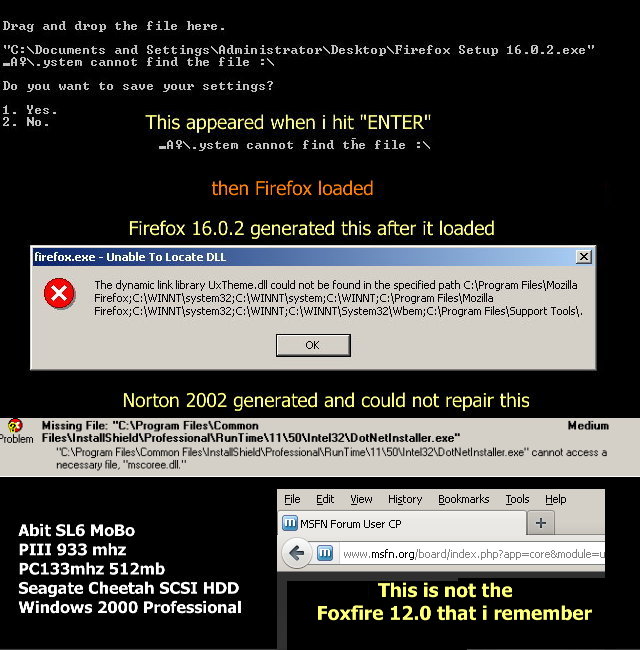
Hello, I came from the Roll up page link > to > here if i had any issues with the roll ups and loading Firefox Setup 16.0.2 into Windows 2000 Professional. Every time i drag Firefox Setup 16.0.2 into the DOS shell Application Compatibility Launcher i get the same errors inclusive to a Intel 32 file which Norton finds and cannot access for repair , i`m not sure what that is (Install shield?) inclusive to the second command line ystem cannot find the file :\ Firefox Setup 16.0.2 loads fine , but when it tries to boot itself up it crashes or fails and creates the Log File shown in the picture i posted. Even after i restart the computer. When i pull everything out and load Firefox Setup 12.0 back in it works fine, however it seems that Firefox Setup 16.0.2 leaves behind it`s GUI shell and merges with Firefox 12.0. The same File logs are created loading onto Firefox 12.0 and without it.installed , and so i`m confused and not sure what is going on ? one last comment on the Application Compatibility Launcher ,as far as saving files 1.Yes. or 2. No. i`m not so sure as how critical of what it needs , but i do not know how to do that? I just typed in an " N and enter" I`m learning as i go. The other thing that i noticed was when i open any existing Word pad files that there is a lot of hex writing on them above and below what i already had on there, fortunately i am sitting on a fresh fdisk, format and boot without anything but Win2K , bare bones. I believe that i followed all the roll up page procedures correctly including restarting after loading an application even reloading SP4 and Rollup 1 Thanks-in advance for all your help!! Service Pack 4 and Update Roll up 1 W2KSP4_EN Windows2000-Rollup 1 KB891861-v2-x86-ENU Windows Installer -KB893803-v2-x86 Update Roll up 2 (UR2) Windows2000-UpdateRollup2-x86-ENU Windows2000-UURollup-v10d-x86-ENU Win2000 Flash 11.1.102.55 Firefox Setup 12.0 Firefox Setup 16.0.2