Case
Content Type
Profiles
Forums
Events
Everything posted by Case
-
I have been running with StartAllBack disabled for the last week or so and today the bug reappeared despite that. So you are right. It happens even though Process Explorer shows that the process has nothing but Microsoft's dlls loaded. Sorry for falsely blaming you.
-
Do you have tips how to troubleshoot potential other cause then? Note that the issue doesn't trigger immediately. I keep my machine always on and at some point a misclick lets me see that the glitch is back. At the moment I can't unfortunately do any debugging about it as I just logged out and back in and that seems to clear the issue, at least temporarily. But I had StartAllBack disabled for the last two weeks as a test and during that time I didn't see this glitch at all. But the native taskbar is intolerable.
-
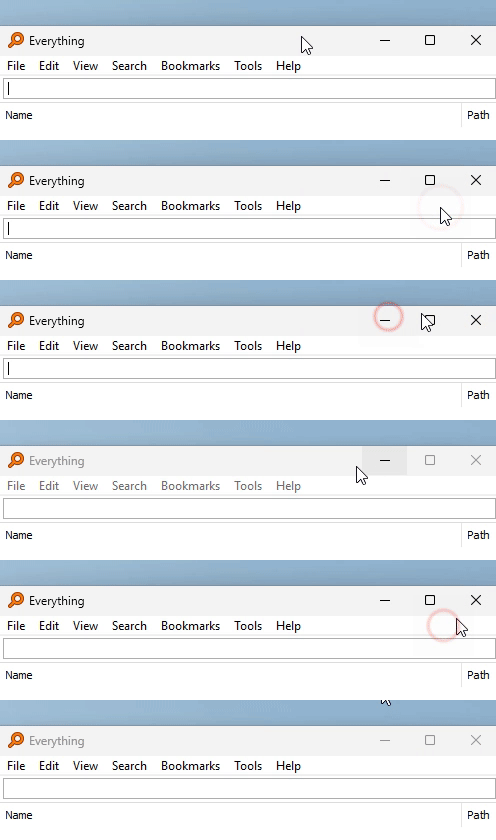
There's another strange issue I have run into with StartAllBack. With many programs that have a menu bar below the titlebar, if you click an empty portion of that menu the titlebar stops reacting until focus is manually changed somewhere else, like you click on an actual menu item or click somewhere outside the program window. Happens for example in Notepad++, Everything (from Voidtools), partially in Sysinternals Process Explorer. Process Explorer is special, it still shows the hover effects, though with a lag, but the buttons don't react.

-
When StartAllBack is active UltraEdit doesn't show up on Taskbar when it's run. One needs to first set focus to some other window, then focusing UE's window makes the icon appear.
-
There are two issues I'd like to see solved in StartIsBack. First is minor: typed text in the search field should match other text instead of remaining light gray. Second issue is a bit more difficult. Triggering the problem requires disabling desktop dimming from the UAC prompt. When you start something that requests elevation from the search bar in the start menu with keyboard, the elevation prompt has no focus. And the window that used to have focus previously loses it too. It can be triggered for example by typing "regedit" and simply pressing enter. Or it can be triggered by typing random program, say "calc", and pressing ctrl+shift+enter.