



Skip to content
View in the app

A better way to browse. Learn more.

MSFN

A full-screen app on your home screen with push notifications, badges and more.

To install this app on iOS and iPadOS
  1. Tap the Share icon in Safari
  2. Scroll the menu and tap Add to Home Screen.
  3. Tap Add in the top-right corner.
To install this app on Android
  1. Tap the 3-dot menu (⋮) in the top-right corner of the browser.
  2. Tap Add to Home screen or Install app.
  3. Confirm by tapping Install.

allenhiltz

Member
  • Joined

  • Last visited

  • Country

    Canada
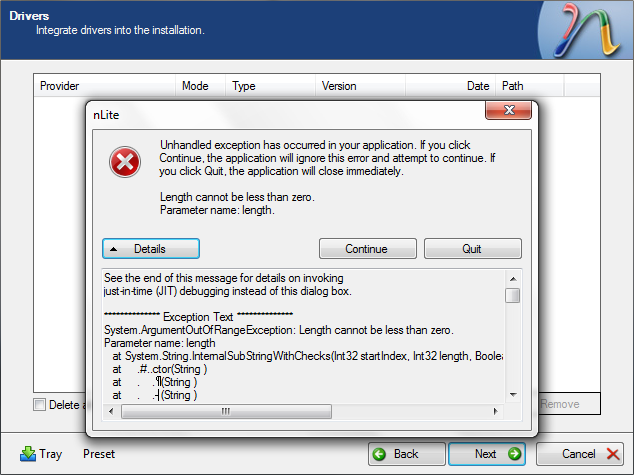
  1. I wanted to slipstream WinVBlock into a USB installer of XP using nlite (so I wouldn't have to press F6 during setup) But a problem occured when trying to slipstream this driver. nlite would report "unhandled exception" and "length cannot be less than zero" However, I found a solution for this! The problem is caused by some empty space between lines 24 and 27 in the TXTSETUP.OEM within WinVBlock I found if I deleted all the space after WinVBlock64 = "WinVBlock Bus (64-bit)" and before ; iaAHCI.inf then the error goes away. So here's what to do: Open up TXTSETUP.OEM, place you cursor at the end of line 24. Press delete 4 or 5 times to remove all the empty space. Press Enter twice to recreate some empty space. Save. I hope this helps someone else as much as it helped me.
Account

Navigation

Configure browser push notifications

Chrome (Android)
  1. Tap the lock icon next to the address bar.
  2. Tap Permissions → Notifications.
  3. Adjust your preference.
Chrome (Desktop)
  1. Click the padlock icon in the address bar.
  2. Select Site settings.
  3. Find Notifications and adjust your preference.