AmazingGecko
Content Type
Profiles
Forums
Events
Everything posted by AmazingGecko
-
Hard drive not explorable
AmazingGecko replied to AmazingGecko's topic in Hard Drive and Removable Media
Well, I think that was bourne out by my original issue - Windows sees the partitions and their properties but can't read the file system therein. It can't even assign a drive label. Anyway, I did look at that open source project earlier. It looks like it's in continual development and not a full release and as I'm paranoid about losing my data I think I'm just going to put the drives back into the original NAS unit which I still have fortunately. Why isn't life ever simple?!? -
Hard drive not explorable
AmazingGecko replied to AmazingGecko's topic in Hard Drive and Removable Media
Just read some negative reviews on that software so scrapped that idea. If I can't be confident in the driver then I'll stick the drives back in the old NAS and do it that way. Thanks for your assistance. James -
Hard drive not explorable
AmazingGecko replied to AmazingGecko's topic in Hard Drive and Removable Media
Think I may have found the solution to this one. It turns out Synology use EXT4 file system hence the problem with reading the drives. I'm going to install Paragon ExtFS for Windows. Will post back my results. -
Hard drive not explorable
AmazingGecko replied to AmazingGecko's topic in Hard Drive and Removable Media
Microsoft Windows [Version 10.0.10240] © 2015 Microsoft Corporation. All rights reserved. C:\WINDOWS\system32>diskpart Microsoft DiskPart version 10.0.10240 Copyright © 1999-2013 Microsoft Corporation. On computer: THOR-PC DISKPART> sel disk 1 Disk 1 is now the selected disk. DISKPART> detail disk WDC WD20EARX-00PASB0 ATA Device Disk ID: 0004EE1C Type : ATA Status : Online Path : 1 Target : 0 LUN ID : 0 Location Path : ACPI(_SB_)#ACPI(PCI0)#ACPI(SAT0)#ACPI(CHN1)#ATA(C01T00L00) Current Read-only State : No Read-only : No Boot Disk : No Pagefile Disk : No Hibernation File Disk : No Crashdump Disk : No Clustered Disk : No There are no volumes. DISKPART> sel part 1 Partition 1 is now the selected partition. DISKPART> detail part Partition 1 Type : FD Hidden: Yes Active: No Offset in Bytes: 131072 There is no volume associated with this partition. DISKPART> sel part 2 Partition 2 is now the selected partition. DISKPART> detail part Partition 2 Type : FD Hidden: Yes Active: No Offset in Bytes: 2550136832 There is no volume associated with this partition. DISKPART> sel part 3 Partition 3 is now the selected partition. DISKPART> detail part Partition 3 Type : FD Hidden: Yes Active: No Offset in Bytes: 4831838208 There is no volume associated with this partition. DISKPART> sel disk 1 Disk 1 is now the selected disk. DISKPART> sel part 3 Partition 3 is now the selected partition. DISKPART> assign There is no volume specified. Please select a volume and try again. DISKPART> -
Hard drive not explorable
AmazingGecko replied to AmazingGecko's topic in Hard Drive and Removable Media
Yes, they were RAID 1 I think -
Hard drive not explorable
AmazingGecko replied to AmazingGecko's topic in Hard Drive and Removable Media
Only options available for that disk is "Delete Volume" and "Convert to Dynamic Disk". -
Hard drive not explorable
AmazingGecko replied to AmazingGecko's topic in Hard Drive and Removable Media
Microsoft Windows [Version 10.0.10240] © 2015 Microsoft Corporation. All rights reserved. C:\WINDOWS\system32>diskpart Microsoft DiskPart version 10.0.10240 Copyright © 1999-2013 Microsoft Corporation. On computer: THOR-PC DISKPART> list disk Disk ### Status Size Free Dyn Gpt -------- ------------- ------- ------- --- --- Disk 0 Online 223 GB 0 B * Disk 1 Online 1863 GB 129 MB DISKPART> select disk 1 Disk 1 is now the selected disk. DISKPART> list part Partition ### Type Size Offset ------------- ---------------- ------- ------- Partition 1 Primary 2431 MB 128 KB Partition 2 Primary 2048 MB 2432 MB Partition 3 Primary 1858 GB 4608 MB DISKPART> list vol Volume ### Ltr Label Fs Type Size Status Info ---------- --- ----------- ----- ---------- ------- --------- -------- Volume 0 C NTFS Partition 222 GB Healthy Boot Volume 1 FAT32 Partition 100 MB Healthy System Volume 2 NTFS Partition 450 MB Healthy Hidden DISKPART> -
Hard drive not explorable
AmazingGecko replied to AmazingGecko's topic in Hard Drive and Removable Media
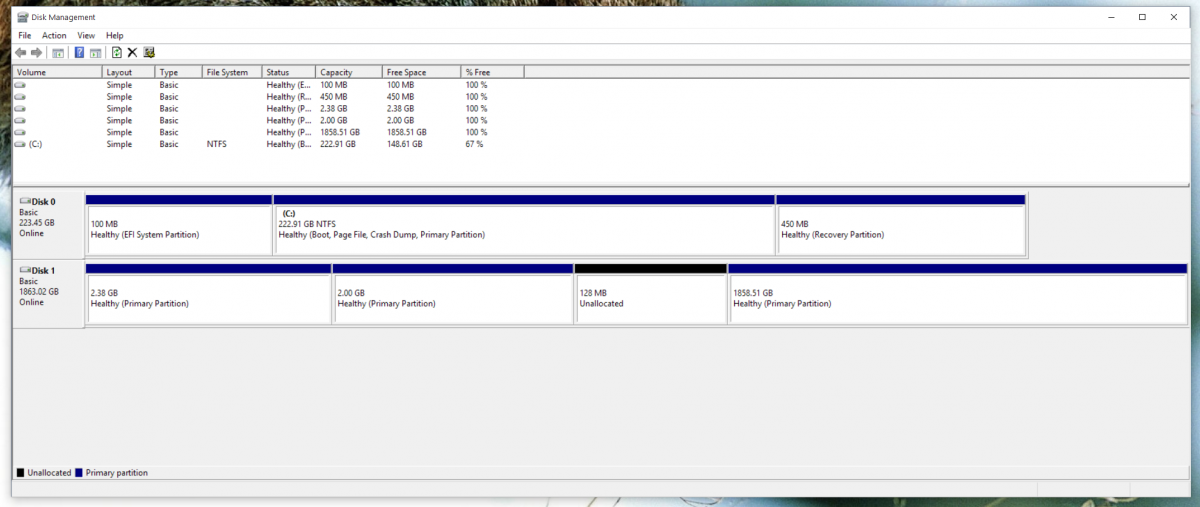
Updated post with screenshot attached -
Apologies if this is in the wrong section but it seemed as good as any. Ok, so I've just upgraded my NAS unit and disks. All seemed good until I discovered that some folders had mysteriously disappeared. No fear, I thought, as I still have the 2 drives I swapped out with the original folders still on them. I plug one in to my rig and the BIOS happily acknowledges it's existence. Windows 10 however seems less sure of itself. Disk Management shows it with all it's partitions, volumes, etc, but the drive just isn't explorable. The unit was a Synology DS212J and the drives are WD20EARX. So, is this a Windows 10 issue, some kind of proprietary software that Synology used when in the unit or something else I've overlooked? Any help would be appreciated. Cheers James

-
Thanks for your suggestion. It doesn't have the assigned hotkey you mentioned but I am starting to think that the keyboard itself is at fault.
-
This has become a real annoyance to me and I'm now desperate for ideas and possible solutions. As I type on my keyboard the Windows 7 calculator program opens spontaneously. However, I can never replicate the issue. I've never used hotkeys and according to my online research there is no Windows Shortcut assigned to the calculator so I can't be opening it by accident via a shortcut. I've just installed a piece of keylogging software but that hasn't helped as it just shows me what I've just typed not the exact keystroke. It's happened twice whilst writing this and happens frequently regardless of the software being used. If keyboard use is required then it will happen. Can anyone shed any light on this? Thanks in advance. James