Skip to content
View in the app

A better way to browse. Learn more.

MSFN

A full-screen app on your home screen with push notifications, badges and more.

To install this app on iOS and iPadOS
  1. Tap the Share icon in Safari
  2. Scroll the menu and tap Add to Home Screen.
  3. Tap Add in the top-right corner.
To install this app on Android
  1. Tap the 3-dot menu (⋮) in the top-right corner of the browser.
  2. Tap Add to Home screen or Install app.
  3. Confirm by tapping Install.

NukeGuy

Member
  • Joined

  • Last visited

  • Country

    Pakistan

Everything posted by NukeGuy

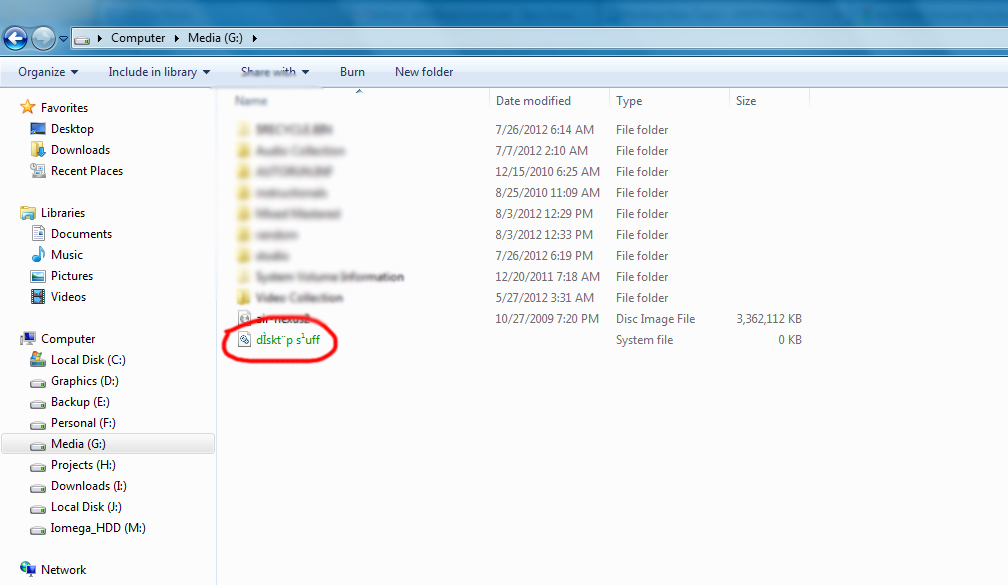
  1. Hello everyone, After a detailed search i came across this forum and found it helpful. Hope it works for me. I don't know much but I think my problem is weird. My PC is mostly use for MUSIC PRODUCTION and GRAPHICS stuff and all... Mostly i had made different folders in different drives and SHORT-KEYING them on desktop. One of my folder titled "DESKTOP STUFF" was in my drive's partition G: Apparently I cannot access my FOLDER, its showing 0kb of size and the extension is changed to .SYS The folder consists of around 15gb of data. I tried searching the files form the folders from search but no results. But when i check the drive's property it shows the SIZE including the HIDDEN 30GB. M kinda confuse and worried.. Help me out please

Account

Navigation

Search

Search

Configure browser push notifications

Chrome (Android)
  1. Tap the lock icon next to the address bar.
  2. Tap Permissions → Notifications.
  3. Adjust your preference.
Chrome (Desktop)
  1. Click the padlock icon in the address bar.
  2. Select Site settings.
  3. Find Notifications and adjust your preference.