Skip to content
View in the app

A better way to browse. Learn more.

MSFN

A full-screen app on your home screen with push notifications, badges and more.

To install this app on iOS and iPadOS
  1. Tap the Share icon in Safari
  2. Scroll the menu and tap Add to Home Screen.
  3. Tap Add in the top-right corner.
To install this app on Android
  1. Tap the 3-dot menu (⋮) in the top-right corner of the browser.
  2. Tap Add to Home screen or Install app.
  3. Confirm by tapping Install.

themiddaysun

Member
  • Joined

  • Last visited

  • Country

    United States
  1. Vista support would be nice.
  2. It seems to be OK for me, only one cab file in the critical updates, other than that, looks good. Please add to the official page.
  3. I voted yes, but it depends on what codecs were installed. I have most codecs already downloaded and installed on my machine. But still it would be a nice things to have on a rebuild or new build.
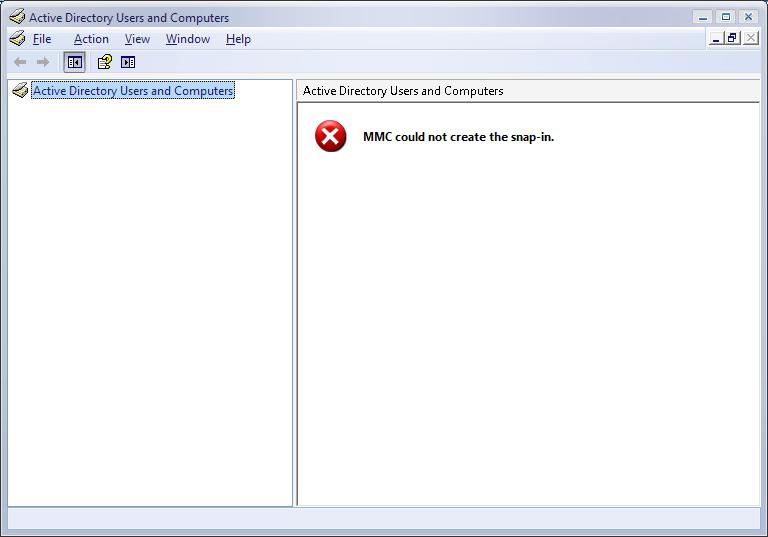
  4. Anyone know where I may find the MMC snap-in for Vista 5219? I have tried the dsa.msc from WindowsXp and the dsa.msc from Windows Server 2003 and neither work. Receive a message stating "MMC could not create the snap-in". Any help or suggestions would be appreciated.

Account

Navigation

Configure browser push notifications

Chrome (Android)
  1. Tap the lock icon next to the address bar.
  2. Tap Permissions → Notifications.
  3. Adjust your preference.
Chrome (Desktop)
  1. Click the padlock icon in the address bar.
  2. Select Site settings.
  3. Find Notifications and adjust your preference.