Skip to content
View in the app

A better way to browse. Learn more.

MSFN

A full-screen app on your home screen with push notifications, badges and more.

To install this app on iOS and iPadOS
  1. Tap the Share icon in Safari
  2. Scroll the menu and tap Add to Home Screen.
  3. Tap Add in the top-right corner.
To install this app on Android
  1. Tap the 3-dot menu (⋮) in the top-right corner of the browser.
  2. Tap Add to Home screen or Install app.
  3. Confirm by tapping Install.

chrispe455

Member
  • Joined

  • Last visited

  • Country

    United States

Everything posted by chrispe455

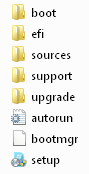
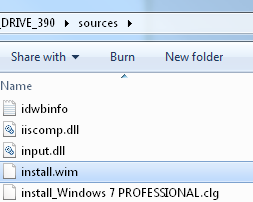
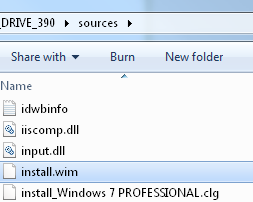
  1. I am having issues automating an install from a usb stick. I added pic's of the directory structure to this post. It is a syspreped wim file in the sources directory. Right now we boot off of it and run setup and format the drives, add computer name, locatioin, and lic.key. I would like to automate the process with an unattend.xml file, but having issues. I imported the wim into Deployment workbench, tried to get it to work that way with no such luck. Can someone outline the correct procedure for doing this? I have been playing with the image manager and deployment tool kit and the win AIK for a week, but think I am in onver my head. Please help.


Account

Navigation

Configure browser push notifications

Chrome (Android)
  1. Tap the lock icon next to the address bar.
  2. Tap Permissions → Notifications.
  3. Adjust your preference.
Chrome (Desktop)
  1. Click the padlock icon in the address bar.
  2. Select Site settings.
  3. Find Notifications and adjust your preference.