Everything posted by Dacer
-
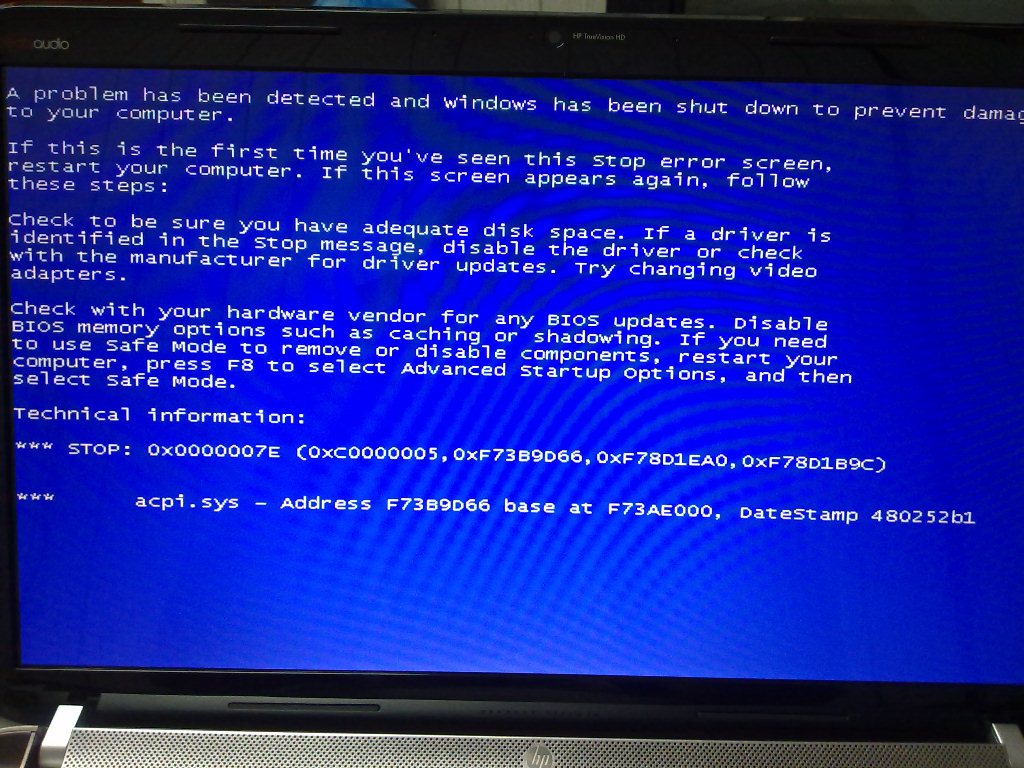
this sentence gave another dimension to re-think about the possiblity of BSOD. I carefully read the message in the BSOD and since you indicated that 00007E is not the cause of HDD recognition then I narrowed my search to the possible driver failure mention inthe BSOD message. and I googled about ACPI "Advanced Configuration and Power Interface (ACPI)" found part of information at HP support forum and remaining here "http://www.theeldergeek.com/clean_installation_of_windows_xp.htm" I tried the same during the setup with the Slip Streamed XP2 when Windows asked for hitting F6 I hit F5 and got two options and I selected the first one(which I don't remember) and after that it hanged at "Windows is starting.....) Later on I made another attempt and tried instead of F5 I hit F7 and here we go! WinXp completed installing as usual. I don't have much in depth knowledge about the ACPI and relation to F7 but I got it. the next Challenging task I have is Drivers installation. At the moment no driver is getting installed except the LAN. I click drivers and they start installing but without results still the hurdle ahead!
-
Hi, Tripredacus, Thanks alot I was really wondering what this code is 0x0000007E ? Thanks for the information infact my machine has the following configuration I hope this would put some light to help comeout with some solution. Processor Intel® Core™ i5-2430M 2.4 GHz 3 MB L3 cache Chipset Intel HM65 Express Memory 4 GB DDR3 (1 x 4 GB) Total slots: 2 user accessible Upgradeable to 8 GB DDR3 Storage 500 GB SATA (5400 rpm) Up to 12 GB partition for system recovery SuperMulti DVD±R/RW with Double Layer Support Mobile entertainment HP TrueVision HD Webcam with Integrated Digital Microphone (low-light) Communication Integrated 10/100/1000 Gigabit Ethernet LAN Intel 802.11 b/g/n; Bluetooth with WiDi Multi-Format Digital Media Card Reader for Secure Digital cards, Multimedia cards Ease of use Integrated fingerprint reader Display 39,6 cm (15,6") High-Definition LED BrightView Display Display Resolution: 1366 x 768 Video AMD Radeon HD 6490M (1 GB DDR5 dedicated, up to 2.97 GB total) Sound Beats Audio for superior sound I had read in some forum, which I forgot, regarding the video driver causing problem for xp installation may be the same what you have advised. Iam here attaching the BSOD screen I face always. So, any solution about it? I am a die hard fan of Xp feel a sort of emptiness in my machine if it is not dual booted XP + Win 7. Thanks. Yeah! just now I did try booting with XP Disk and it is the same result I am attaching the fresh shot of BSOD .
-
Hi, Tripredacus, Thanks alot I was really wondering what this code is 0x0000007E ? Thanks for the information infact my machine has the following configuration I hope this would put some light to help comeout with some solution. Processor Intel® Core™ i5-2430M 2.4 GHz 3 MB L3 cache Chipset Intel HM65 Express Memory 4 GB DDR3 (1 x 4 GB) Total slots: 2 user accessible Upgradeable to 8 GB DDR3 Storage 500 GB SATA (5400 rpm) Up to 12 GB partition for system recovery SuperMulti DVD±R/RW with Double Layer Support Mobile entertainment HP TrueVision HD Webcam with Integrated Digital Microphone (low-light) Communication Integrated 10/100/1000 Gigabit Ethernet LAN Intel 802.11 b/g/n; Bluetooth with WiDi Multi-Format Digital Media Card Reader for Secure Digital cards, Multimedia cards Ease of use Integrated fingerprint reader Display 39,6 cm (15,6") High-Definition LED BrightView Display Display Resolution: 1366 x 768 Video AMD Radeon HD 6490M (1 GB DDR5 dedicated, up to 2.97 GB total) Sound Beats Audio for superior sound I had read in some forum, which I forgot, regarding the video driver causing problem for xp installation may be the same what you have advised. Iam here attaching the BSOD screen I face always. So, any solution about it? I am a die hard fan of Xp feel a sort of emptiness in my machine if it is not dual booted XP + Win 7. Thanks.
-
Hi, I recently bought the machine with Intel HM 65 chipet based on sandybridge with pre-loaded Win7 I have been trying to install Xp with all possible drivers I found all through the different forums, even here I went through Fernando's thread "0" I followed what it was mentioned but everytime I get BSOD with code 0x000007E I h ave tried almost all the F6 methods by downloading various AHCI drivers but in vain. even by slipstreaming via Nlite. My Laptop configuration is: HP DV6 - 6b56-ex Processor Intel® Core™ i5-2430M (2.4 GHz 3 MB L3 cache ) Chipset: Intel HM65 Express PCI\VEN_8086&DEV_1C03&SUBSYS_1656103C&REV_05\3&11583659&0&FA BIOS : Disabled to edit. Only AHCI Mode i.e IDE ATA/ATAPI Controller has only "Intel® Mobile Express Chipset SATA AHCI Controller" I tried the latest F6 "10.8_f6flpy-x86" drivers from Intel support page and tried various driver packs which I found consisting of the above AHCI Controller like "RST_10.0.0.1046_WHQL_RAID_AHCI_drv_and_GUI", "DP_Chipset_wnt6-x86_1202.7z" BUT all invain! and BSOD with 7E I request to share the success if any one have succeeded to install XP either via F6 or Nlite slipstreaming. Thanks