Everything posted by MattMatt
-
It was just on "High Performance" Could this be related to that i upgraded the processor from a Core 2 Duo to a Core 2 Quad? What should i be changing? Wow changing it to "Balanced" fixed it, there's still a few spikes but videos are watchable now! You're a genius! (; EDIT: Nope, it's ALOT better. But not quite there..
-
Okay sure! Here The password is MagicAndre1981. Thanks for your help!
-
Gah! So many things causing DPC/Interrupt.. They're mostly windows services too.. Going to reformat on Monday it's easier and should fix it.. Thanks for the support anyways!
-
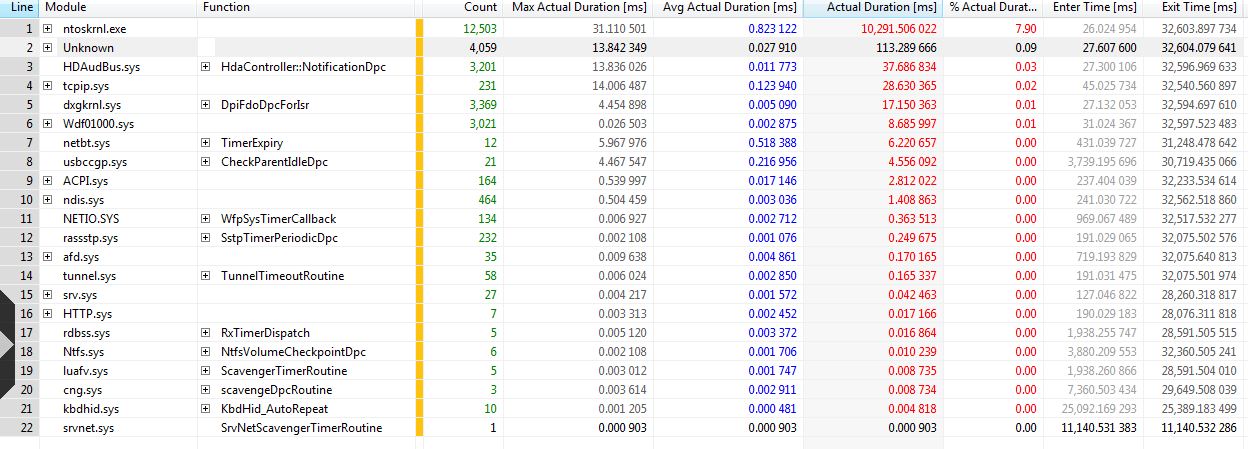
G'day guys, i know this isn't a hot topic or anything but... I've gotten to the stage where it shows me the DPC CPU usage Summary table, my problem is i have no idea on what "ntoskrnl.exe" is.. If i google it it comes up with "FIX BSOD".. Infact there's lots of stuff in there. What should i do about this? Would a reformat be easier? I don't really want to, but this sound problems getting to me.. Is anyone able to help me with my problem? :/