Skip to content
View in the app

A better way to browse. Learn more.

MSFN

A full-screen app on your home screen with push notifications, badges and more.

To install this app on iOS and iPadOS
  1. Tap the Share icon in Safari
  2. Scroll the menu and tap Add to Home Screen.
  3. Tap Add in the top-right corner.
To install this app on Android
  1. Tap the 3-dot menu (⋮) in the top-right corner of the browser.
  2. Tap Add to Home screen or Install app.
  3. Confirm by tapping Install.

cfrodriguez

Member
  • Joined

  • Last visited

  • Country

    Mexico
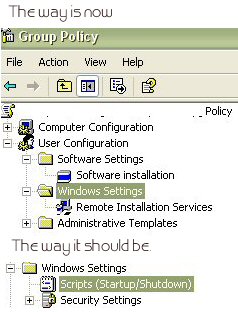
  1. Hi I have installed the Admin Pack and the gpmc in my xp. So i can manage all my domain policies from my pc. Everything worked fine, (i have 2 pc's) with the same configuration. And suddenly in one of them some options disapeared, i dont have any more the security settings and scripts, i only have a remote installation Services, in the user configuration/windows settings. but in the other pc i do have it. I attached a image so you can see what im talking about. Does someone know what i should i do to fix it? I tried uninstalling and installing again the Admin Pack and gpmc., but it doesnt works. Thanks, Carlos Rodriguez

Account

Navigation

Search

Search

Configure browser push notifications

Chrome (Android)
  1. Tap the lock icon next to the address bar.
  2. Tap Permissions → Notifications.
  3. Adjust your preference.
Chrome (Desktop)
  1. Click the padlock icon in the address bar.
  2. Select Site settings.
  3. Find Notifications and adjust your preference.