Skip to content
View in the app

A better way to browse. Learn more.

MSFN

A full-screen app on your home screen with push notifications, badges and more.

To install this app on iOS and iPadOS
  1. Tap the Share icon in Safari
  2. Scroll the menu and tap Add to Home Screen.
  3. Tap Add in the top-right corner.
To install this app on Android
  1. Tap the 3-dot menu (⋮) in the top-right corner of the browser.
  2. Tap Add to Home screen or Install app.
  3. Confirm by tapping Install.

Seraphim

Member
  • Joined

  • Last visited

  • Country

    Ukraine
  1. I`ll try tomorow and post the result .....thanks for useful advice
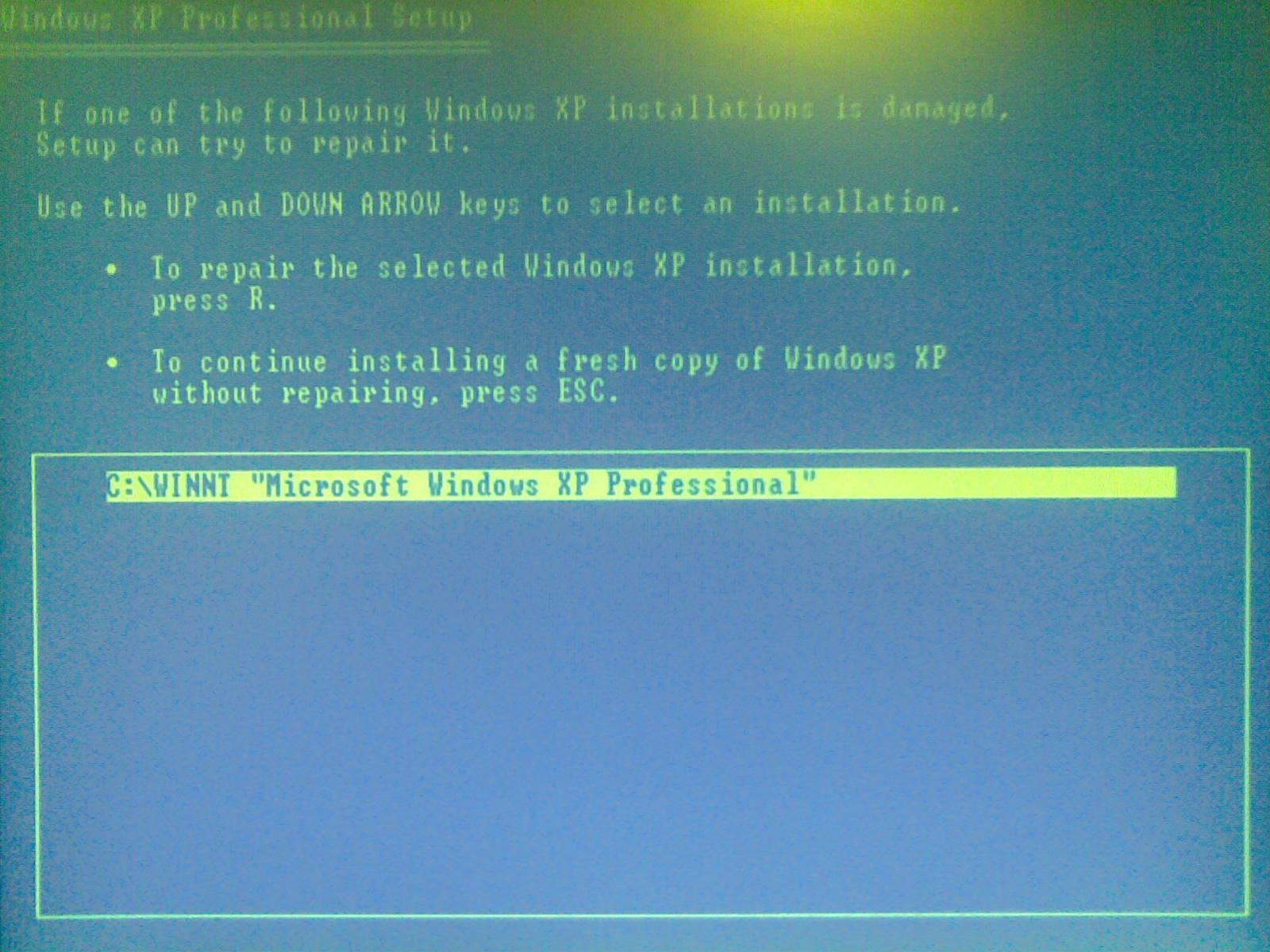
  2. It does not help, already tried..... Here is the screen of the menu I`m fighting for
  3. In this case the installation starts......yes it leaves the files but the route to user profiles, software links.....etc are lost. In case of repair option that I try to reveal, only some system files are reinstalled that all necessary options/links are safe
  4. Hello, Writing to ask for help to solve the next problem with XP installation. From the beginning of the story: There are a number of workstations from Dell (about 100 ) where Win XP have to be repaired (here I mean exactly repair, using the function of repair in the Win XP setup, starts with pressing "r" button ). On most of that workstations CD/DVD drive is not installed so I cant use the Dell CD with XP on it. So I decided to try usb-flash. Transcend JF V30 /2 Gb was chosen as a container for installation. I`ve tried different app-s to make it bootale with installation available (WinSetupFromUSB, PE....etc) After I managed to solve problem with BSOD error at the installation startup (After the the message "Starting windows" appears) by changing the NTDETECT the installation became available. So now I could proceed with installation itself. Its good news for me. But after I accept licence agreement I`m transfered straight to the menu where I should choose the partiotion to install without notifying the another copy is already installed (This menu I want to reveal somehow, because it contains the "Repair option"). Please help me !!! =) P.S. I tried to modify the WINNT.sif but it does not help=(

Account

Navigation

Search

Search

Configure browser push notifications

Chrome (Android)
  1. Tap the lock icon next to the address bar.
  2. Tap Permissions → Notifications.
  3. Adjust your preference.
Chrome (Desktop)
  1. Click the padlock icon in the address bar.
  2. Select Site settings.
  3. Find Notifications and adjust your preference.