Everything posted by RoXoN
-
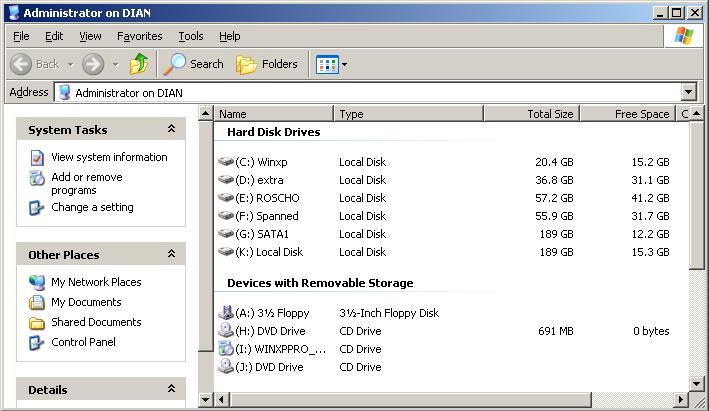
Editted tweak for show driveletters first. Check picture ;Show driveletter first [HKEY_LOCAL_MACHINE\SOFTWARE\Microsoft\Windows\CurrentVersion\Explorer] "ShowDriveLettersFirst"=dword:00000004 Other tweaks that i found ;No ctrl-alt-del at logon [HKEY_LOCAL_MACHINE\SOFTWARE\Microsoft\Windows\CurrentVersion\policies\system] "DisableCAD"=dword:00000001 ;Faster refresh in explorer [HKEY_LOCAL_MACHINE\SYSTEM\CurrentControlSet\Control\Update] "UpdateMode"=dword:00000000 ;Windows xp i386 path [HKEY_LOCAL_MACHINE\SOFTWARE\Microsoft\Windows NT\CurrentVersion] "SourcePath"="c:\\I386" ;Remove Windows media player context menu options like burn [-HKEY_CLASSES_ROOT\CLSID\{CE3FB1D1-02AE-4a5f-A6E9-D9F1B4073E6C}] [-HKEY_CLASSES_ROOT\CLSID\{F1B9284F-E9DC-4e68-9D7E-42362A59F0FD}] [-HKEY_CLASSES_ROOT\CLSID\{8DD448E6-C188-4aed-AF92-44956194EB1F}] ;Adds an extra context-menu with the option to enqueue the directory to winamp, made by myself [HKEY_LOCAL_MACHINE\SOFTWARE\Classes\Directory\shell\Enqueue dir in Winamp] [HKEY_LOCAL_MACHINE\SOFTWARE\Classes\Directory\shell\Enqueue dir in Winamp\command] @="\"G:\\mp3\\Winamp\\winamp.exe\" /ADD \"%1\"" Attention for the WINAMP PATH !!!
-
Does anyone know -how to disable visual effects? -add control panel in start menu, i tried creating a folder named: Control Panel.{21EC2020-3AEA-1069-A2DD-08002B30309D} it works but the id is still visible in the start menu -enable auto arrange by default when install is done -disable hibernation mode -set Turn off monitor after 1 hour That's all :>) and thx war59312 for the key
-
Probeer dit eens werkte bij mij wel ;This disables the screensaver [HKEY_CURRENT_USER\Software\Policies\Microsoft\Windows\Control Panel\Desktop] "ScreenSaveActive"=dword:00000000 [HKEY_CURRENT_USER\Control Panel\Desktop] "ScreenSaveActive"="0" "SCRNSAVE.EXE"="(none)"
-
What's the regkey to add control panel in my computer? The key to auto arrange desktop shortcuts
-
Hi, Is it possible to create an extra toolbar unattend under the taskbar. I use a folder with shortcuts and add the folder as extra toolbar that's under the taskbar. Like this: Does anyone know the regkey for it? i want to implement it in my unattended winxp dvd. Greetz
-
got it, see the attachment for disable winxp sounds nosound.reg
-
does anyone now the tweak to disable windows sounds??? I don't wanna hear a sound from windows
-
it's working now !!!! i changed the product key for another that i found on the inet
-
i tried ProductKey=xxxxx-xxxxx-xxxxx-xxxxx-xxxxx ProductKey="xxxxx-xxxxx-xxxxx-xxxxx-xxxxx" ProductID=xxxxx-xxxxx-xxxxx-xxxxx-xxxxx ProductID="xxxxx-xxxxx-xxxxx-xxxxx-xxxxx" nothing worked, the serial is valid. My pid id ends at 270
-
i hope you can help me, I used this winnt.sif ;SetupMgrTag [Data] AutoPartition=0 MsDosInitiated="0" UnattendedInstall="Yes" [Unattended] UnattendMode=FullUnattended OemSkipEula=Yes OemPreinstall=No [GuiUnattended] AdminPassword=* EncryptedAdminPassword=NO OEMSkipRegional=1 OemSkipWelcome=1 [UserData] ProductKey=xxxxx-xxxxx-xxxxx-xxxxx-xxxxx FullName="mekker" OrgName="aap" ComputerName=Dianeman [Identification] JoinWorkgroup=familie [Networking] InstallDefaultComponents=Yes It's asking for my productkey. If i type it in the installation continues. The winnt.sif has been read because the Fullname and orgname are applied. What's wrong with the winnst.sif !!!
-
Oke i'm gonna try that, vmware can read winnt.sif in I386 folder? or should i test with a floppy?
-
**** that didn't work for me, it's still asking for my serial. My windows xp cd is slipstreamed with sp2. This is my winnt.sif. Can someone see what's wrong? ;SetupMgrTag [Data] AutoPartition=0 MsDosInitiated="0" UnattendedInstall="Yes" [Unattended] OemPnPDriversPath="drivers\000_chipset;drivers\001_netwerk;drivers\002_monitor;drivers\003_nvidia" DriverSigningPolicy=Ignore UnattendMode=FullUnattended OemSkipEula=Yes OemPreinstall=yes UnattendSwitch="yes" TargetPath=\WINDOWS WaitForReboot="No" [GuiUnattended] AdminPassword="1234" EncryptedAdminPassword=NO AutoLogon=Yes OEMSkipRegional=1 TimeZone=110 OemSkipWelcome=1 [UserData] ProductID=XXXXX-XXXXX-XXXXX-XXXXX-XXXXX FullName="mekker" OrgName="test" ComputerName=blaat [Display] BitsPerPel=32 Xresolution=1280 Yresolution=1024 Vrefresh=85 [GuiRunOnce] %systemdrive%\install.cmd [Branding] BrandIEUsingUnattended=Yes [URL] Home_Page=www.google.nl Search_Page = www.google.nl [Proxy] Proxy_Enable=0 Use_Same_Proxy=1 [Identification] JoinWorkgroup=bliep I tried: Productkey with/without quotes productid with/without quotes
-
Hello, is it possible to make a silent hp jetdirect install. This will install a network printer.
-
hello i'm new here i used the following .au3 file and it works great Opt ("SendKeyDelay", 1) Opt ("WinTitleMatchMode", 2) run("setup.exe") ; Welcome Screen WinWaitActive("Firefox Setup") sleep (2500) Send("{ENTER}") ; License Agreement WinWaitActive("Software License Agreement") sleep (250) Send("{UP}{ENTER}") ; Installation Type WinWaitActive("Setup Type") sleep (250) Send("{down}{ENTER}") ; Install folder WinWaitActive("Install Folder") sleep (250) Send("{ENTER}") ; Components WinWaitActive("Select Components") sleep (250) Send("{down}{space}{ENTER}") ; shortcuts WinWaitActive("Set Up Shortcuts") sleep (250) Send("{space}{down}{space}{enter}") ;summary WinWaitActive("Select Components") sleep (250) Send("{ENTER}") ;Install complete WinWaitActive("Install Complete") Send("{space}{enter}") ; Exit Application WinClose("Firefox") Exit It's the custom install without dekstop icon and quality feedback agent install.exe