Skip to content
View in the app

A better way to browse. Learn more.

MSFN

A full-screen app on your home screen with push notifications, badges and more.

To install this app on iOS and iPadOS
  1. Tap the Share icon in Safari
  2. Scroll the menu and tap Add to Home Screen.
  3. Tap Add in the top-right corner.
To install this app on Android
  1. Tap the 3-dot menu (⋮) in the top-right corner of the browser.
  2. Tap Add to Home screen or Install app.
  3. Confirm by tapping Install.

Wilhelm

Member
  • Joined

  • Last visited

  • Country

    Croatia

Everything posted by Wilhelm

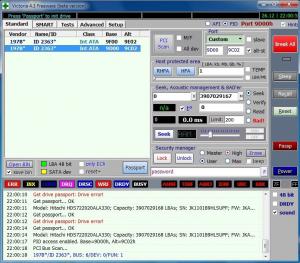
  1. I think you’re right and that was bothering me also when I made this screenshot. The thing is that I disconnected all drives except Hitachi 2TB and Seagate. So both lines refer to Hitachi? Also I don’t have a defective Hitachi drive. Maybe it’s a problem between Seagate, Victoria and BIOS AHCI setup? I will try to connect the Seagate drive to a Win XP computer and report back..
  2. Can somebody help me verify the problem on my Seagate 7200.11 1TB disk? Disk has date code 09104 (9/2008), was bought in November 2008, flashed to SD1A in October 2009 and was working fine until couple of days ago. BIOS doesn’t recognize HDD and it seems that the disk is spinning up and down. The thing that’s confusing is the Victoria program that doesn’t have BUSY turned on when I do the check. So is this 0LBA or BSY problem or perhaps something else? I haven't tried any recovery procedure until somebody here verifies the problem. Thanks.

Account

Navigation

Search

Search

Configure browser push notifications

Chrome (Android)
  1. Tap the lock icon next to the address bar.
  2. Tap Permissions → Notifications.
  3. Adjust your preference.
Chrome (Desktop)
  1. Click the padlock icon in the address bar.
  2. Select Site settings.
  3. Find Notifications and adjust your preference.