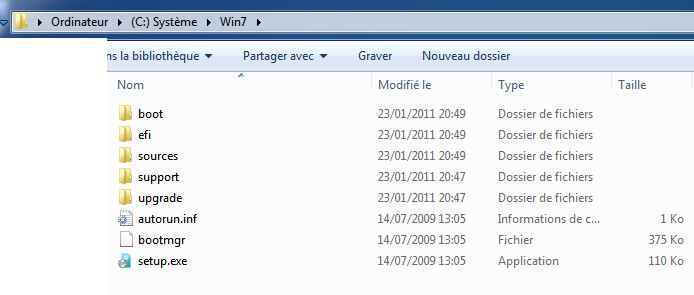
-
ei.cfg [EditionID] Ultimate [Channel] Retail [VL] 0
-
There is no file "Autounattend.xml"
-
here is my file log thank you Fred log.txt
-
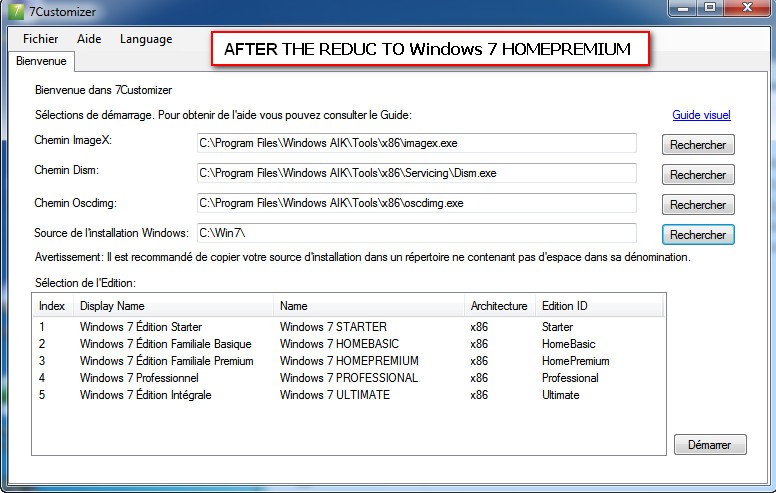
hello, I do not understand: I 'used' 7customizer0.44 "I find it quite convenient, but it happens when I select for example "Windows 7 HOMEPREMIUM" image 3 in the end it settle down version of Ultimate is the image 5 ... thank you for your help.
-
I boot on my cle I n'ai accés with the hard disk of this ordi but only with my key USB I d'ont understand thank you for your assistance! Regards jamfrey
-
What must one put in the file reg. to remove: "My Music, My Video, My Pictures" How that = that does not function! Thank you Fred
-
Please, How can one add in the contextual menu of the mouse the functions: reboot and shutdown (the PC) Thanqs Fred
-
Please; Who connait the paramettres for a silentieuse installation..? Thanks Fred
-
http://www.inachis.com/download/index.php In fact E-backup does not settle... It makes party of my Install.bat with the order: start/wait %systemdrive%\Install\Ebackup\ebackup.msi/qn REBOOT=Suppress Install.bat is ordered by cmdlines.txt: all this master key well except E-backup.msi which does not settle. In "cmdlines" I have also my clean.bat which plays its role at the end, with the reboot of the PC! After the reboot of the PC, with the loading of my parameters, E-backup seek its files of installations which it does not find normal... parcqu' it would have to settle in T-12.
-
In does an installation in mode unattend, How install the your drivers for the asus A7n8x-E ? (except the drivers sata) Thank you for your assistance
-
In an installation in unattend mode, How can one remove the icone Favoris network ? Thank! Fred
-
For win XPPRO SP2, How to make to have the look win 2000 during the installation in unattend mode...? thank you for your assistance! Fred