Skip to content
View in the app

A better way to browse. Learn more.

MSFN

A full-screen app on your home screen with push notifications, badges and more.

To install this app on iOS and iPadOS
  1. Tap the Share icon in Safari
  2. Scroll the menu and tap Add to Home Screen.
  3. Tap Add in the top-right corner.
To install this app on Android
  1. Tap the 3-dot menu (⋮) in the top-right corner of the browser.
  2. Tap Add to Home screen or Install app.
  3. Confirm by tapping Install.

ShadabTheDaddy

Member
  • Joined

  • Last visited

  • Country

    India
  1. I am having the same problem bro... but my XP SP3 CD shows the same error in Virtualbox too. I am not aware of where i am making a mistake. I know my Drives are perfectly alright (as my older SP3 cds format them easily). The problem is with my new CD but i am not able to figure it out. Help me if you can.
  2. What is this going on..... 46 Views & NO replies. Is no one aware of the solution to the problem???? Is this MSFN "where people go to know" Please HELP ME OUT guys.... I really need to make a custom XP
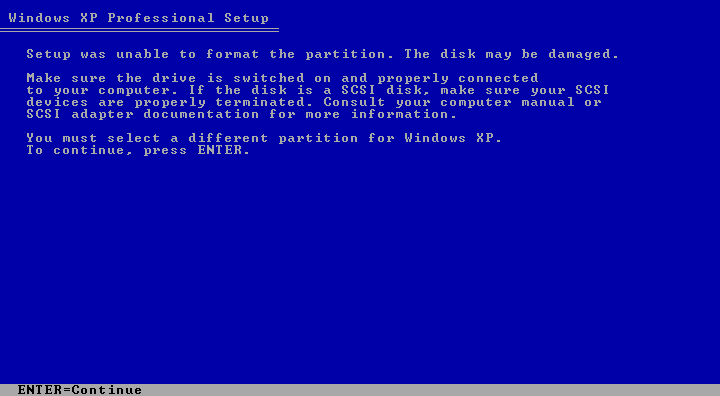
  3. Hi Guys.... I am trying to create a personalized Windows XP SP3 for myself. I have done most of the job so i converted it to an ISO using nLite for some testing in Virtualbox. Now, during the Text Mode setup I encounter this error when i try to format a drive.(i have attached the screenshot too) --------- "Setup was unable to format the partition. The disk may be damaged. Make sure the driver is switched on and properly connected to your computer. You must select a different partition for Windows XP." --------- I have tried another Virtual Partitions too but same problem. I also deleted the partition and created it again but it shows the same error when i try to format it. I thought that it was a problem with Virtual Box so i created a CD of my XP and tried to install it on my Harddisk itself but all in vain. I am sure that my harddisk is not corrupt as one of my older SP2 CD formatted it with ease and it got installed too. All in all i have tried everything that i know of computers but am not able to work it out. So, please help me guys.......ASAP


Account

Navigation

Configure browser push notifications

Chrome (Android)
  1. Tap the lock icon next to the address bar.
  2. Tap Permissions → Notifications.
  3. Adjust your preference.
Chrome (Desktop)
  1. Click the padlock icon in the address bar.
  2. Select Site settings.
  3. Find Notifications and adjust your preference.