Skip to content
View in the app

A better way to browse. Learn more.

MSFN

A full-screen app on your home screen with push notifications, badges and more.

To install this app on iOS and iPadOS
  1. Tap the Share icon in Safari
  2. Scroll the menu and tap Add to Home Screen.
  3. Tap Add in the top-right corner.
To install this app on Android
  1. Tap the 3-dot menu (⋮) in the top-right corner of the browser.
  2. Tap Add to Home screen or Install app.
  3. Confirm by tapping Install.

Willem4444

Member
  • Joined

  • Last visited

  • Country

    South Africa
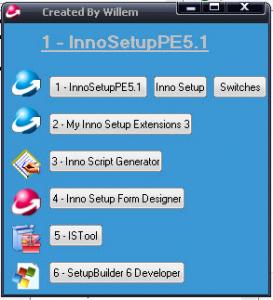
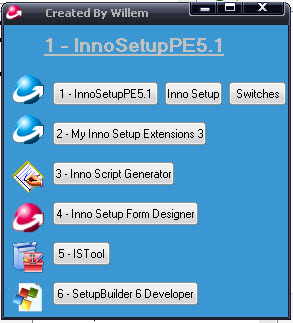
  1. I Would Say Inno Setup is the Best installation packager i have tried yet.. It works esay and its sumple. I have Created an Inno Setup Portable App;ication that you can use without installing any Inno setup Software you can run it from any removable drive and use is here is i picture what is consist of. It has got 1.INNOSETUP PACKAHER BUILDER.(iNNO sETUP INSTALLATION sETUP) 2.SWITCHES EXAMPLES 3.MY INNO SETUP EXTENSION 3 4.INNO SCRIPT BUILDER 5.INNOSETUP FORM DESIGNER 6.ISTOOL 7.SETUPBUILDER 6 DEVELOPER. iF YOU HAVE ANYTHING TO ADD JUST DROP ME I MAIL AT WILLEMKC@HOTMAIL.COM http://cid-f0ef201d3f90ee6a.skydrive.live.com/browse.aspx/.Public?uc=2 iF YOU WONT THE TOOL I CREATED IS ON MY SKYDRIVE 2.
Account

Navigation

Search

Search

Configure browser push notifications

Chrome (Android)
  1. Tap the lock icon next to the address bar.
  2. Tap Permissions → Notifications.
  3. Adjust your preference.
Chrome (Desktop)
  1. Click the padlock icon in the address bar.
  2. Select Site settings.
  3. Find Notifications and adjust your preference.