



Skip to content
View in the app

A better way to browse. Learn more.

MSFN

A full-screen app on your home screen with push notifications, badges and more.

To install this app on iOS and iPadOS
  1. Tap the Share icon in Safari
  2. Scroll the menu and tap Add to Home Screen.
  3. Tap Add in the top-right corner.
To install this app on Android
  1. Tap the 3-dot menu (⋮) in the top-right corner of the browser.
  2. Tap Add to Home screen or Install app.
  3. Confirm by tapping Install.

skydust11

Member
  • Joined

  • Last visited

  • Country

    United States
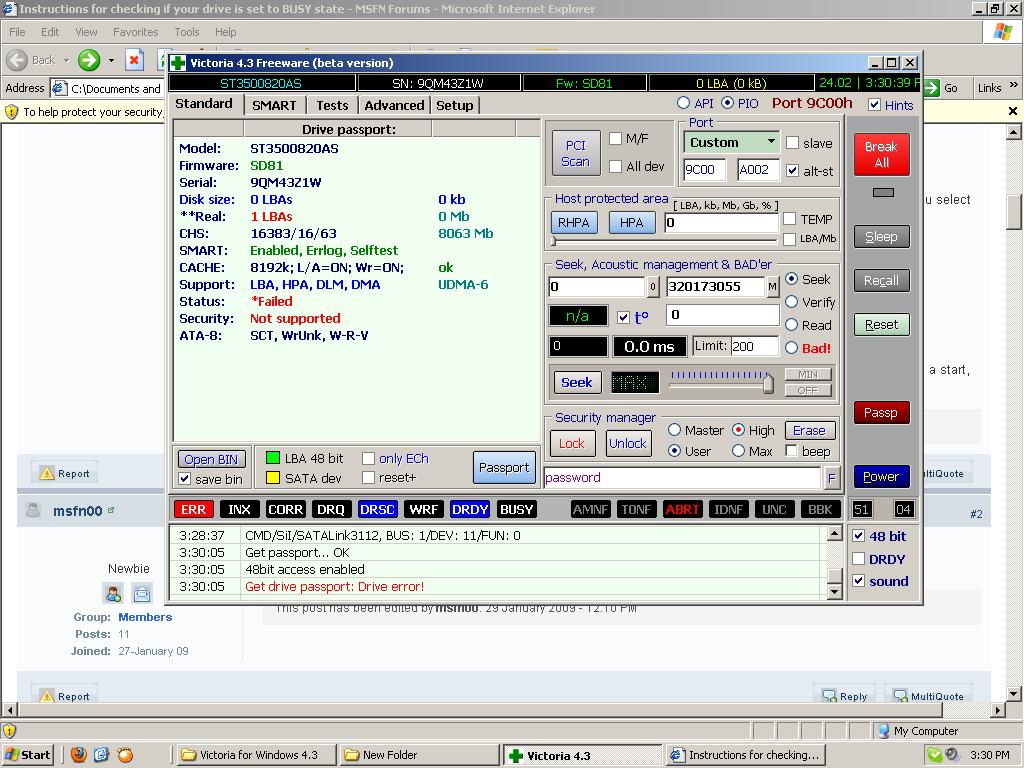
  1. I am in need of expert advice and help. The hard drive is a Seagate Barracuda 7200.11 500GB ST3500820AS P/N 9BX134-568 Firmware SD81 I have a sound file so you can hear the sound that it makes, and I have 2 pics I made from using Victoria for Windows 4.3 Can anyone diagnose and tell me what the problem is and how to fix it. I don't have $400-$2400 to pay the experts cause i'm unemployed and that was the amount giving to me when I called a data recover center in my area. Wow that's pricey. Actually I'm a stay at home dad taking care of the baby girl and my wife so desperately wants me to recover this data to get the hospital pics and movies back of the baby. If anyone can help me I have no problem paying for it. We just don't have enough money to fork out $1,000/ A Grand to get the data back cause were not rich. Thanks
Account

Navigation

Configure browser push notifications

Chrome (Android)
  1. Tap the lock icon next to the address bar.
  2. Tap Permissions → Notifications.
  3. Adjust your preference.
Chrome (Desktop)
  1. Click the padlock icon in the address bar.
  2. Select Site settings.
  3. Find Notifications and adjust your preference.