-
Hi,bensam56, I've updated "resource.ja-JP.txt" and sent a mail to you. Please check the attached file. Regards.
-
Hi, I made a Japanese guide page for RT Se7en Lite. Updated Aug 8 2010. Based on Beta Build 2.2.0 (RC Build 1.3.0) RT Se7en Lite Guide Regards
-
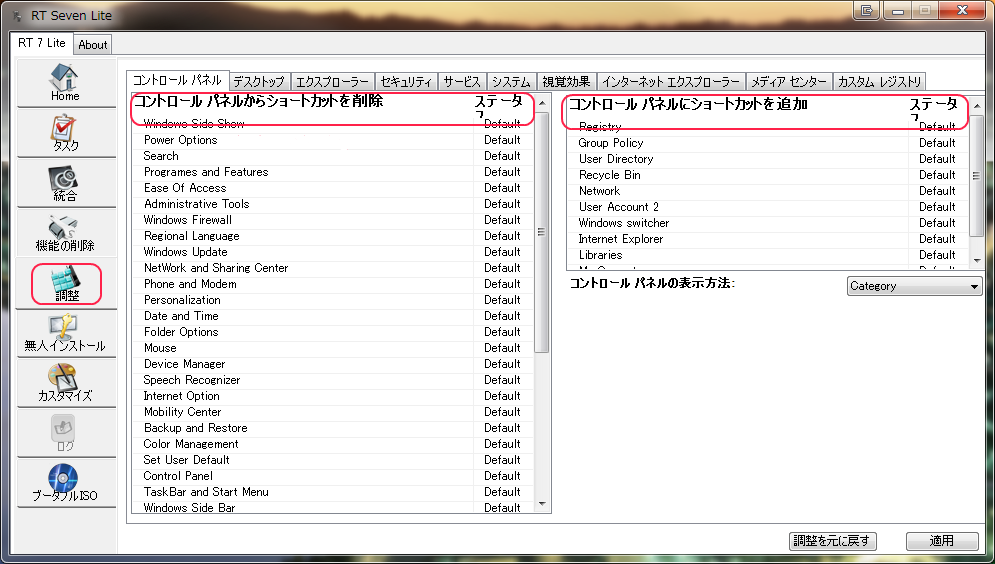
Hi,bensam56 Thank you for releasing the new version. Btw,I've just a little notice. In Tweak section,japanese font is slightly large. Could you please reduce the size?
-
Thank you friend.... Hi,bensam56 Sorry for my typo. By the way,I sent a mail to you. Please check the attached files:resource.ja-JP and Help_ja-JP. Regards.
-
Hi,besam56 Japanese translation for RT Seven Lite will soon complete. I hope that this translation is in time for the next version. Regards.
-
Hi Blue, here are the Japanese.lng(.zip file). Japanese.lng 0.4.3 Regards
-
Hi, works fine with Enterprise x64 Japanese.
-
Hi, I made a Japanese guide page. "7Customizer Guide" http://orange.zero.jp/angel.omega/7Customizer.htm 24 April 2010 updated for v0.4.3 Regards