



Skip to content
View in the app

A better way to browse. Learn more.

MSFN

A full-screen app on your home screen with push notifications, badges and more.

To install this app on iOS and iPadOS
  1. Tap the Share icon in Safari
  2. Scroll the menu and tap Add to Home Screen.
  3. Tap Add in the top-right corner.
To install this app on Android
  1. Tap the 3-dot menu (⋮) in the top-right corner of the browser.
  2. Tap Add to Home screen or Install app.
  3. Confirm by tapping Install.

gramatopulo

Member
  • Joined

  • Last visited

  • Country

    Greece

Everything posted by gramatopulo

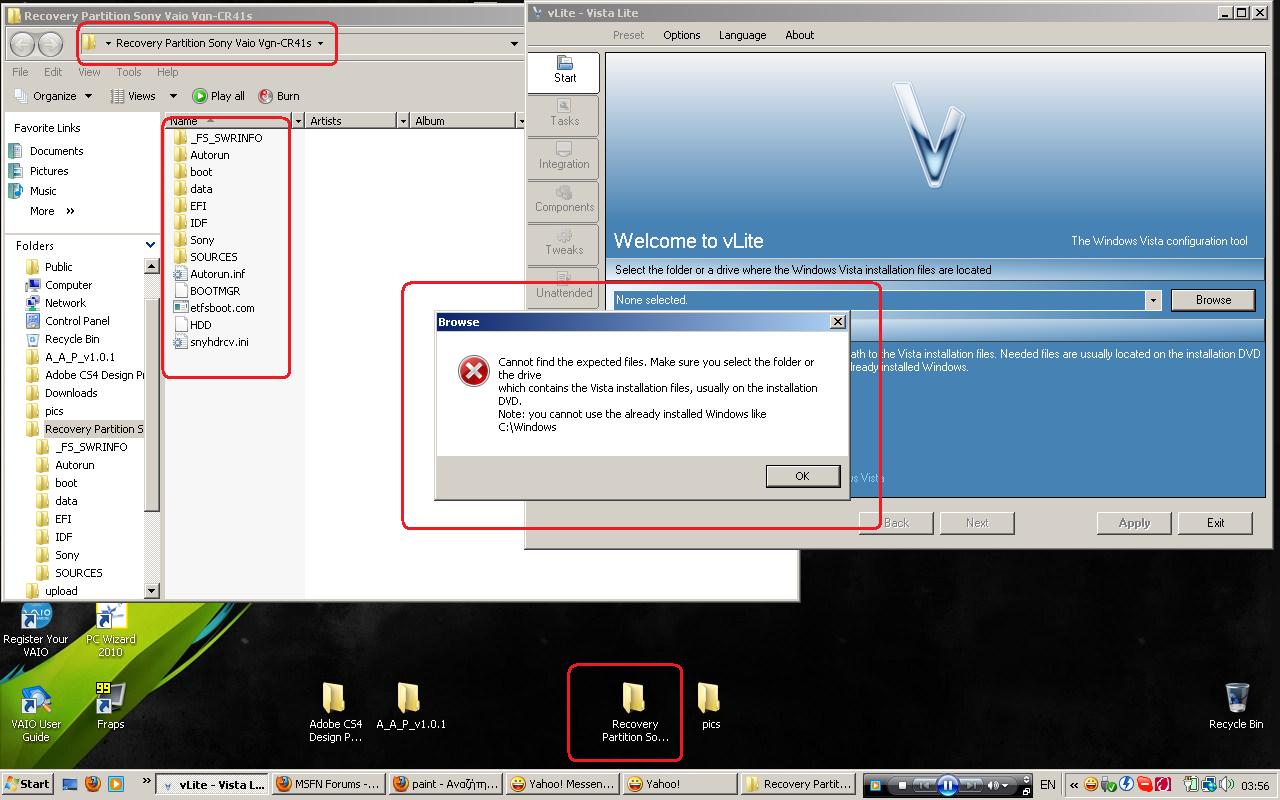
  1. plz anybody help me with this error. <picture attached> . I've copied all the files from my hidden recovery partition on my OEM laptop sony vaio, I'm just trying to change the vista installer but i really cant do it maybe anyone has any experience? I just want the vista that my laptop has what a stupid thing and admins sorry if my post is kinda offtopic I've just made a registration , I'm getting used to the forum
Account

Navigation

Configure browser push notifications

Chrome (Android)
  1. Tap the lock icon next to the address bar.
  2. Tap Permissions → Notifications.
  3. Adjust your preference.
Chrome (Desktop)
  1. Click the padlock icon in the address bar.
  2. Select Site settings.
  3. Find Notifications and adjust your preference.