Skip to content
View in the app

A better way to browse. Learn more.

MSFN

A full-screen app on your home screen with push notifications, badges and more.

To install this app on iOS and iPadOS
  1. Tap the Share icon in Safari
  2. Scroll the menu and tap Add to Home Screen.
  3. Tap Add in the top-right corner.
To install this app on Android
  1. Tap the 3-dot menu (⋮) in the top-right corner of the browser.
  2. Tap Add to Home screen or Install app.
  3. Confirm by tapping Install.

distorted

Member
  • Joined

  • Last visited

  • Country

    Canada

Everything posted by distorted

  1. distorted replied to distorted's topic in Windows XP
    yes it works thanks alot SONB u r genious
  2. distorted posted a topic in Windows XP
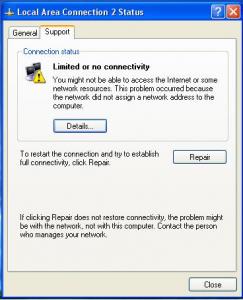
    Issue 1: Just installed SP2 (2180 RTM), and already cant look at this ugly luna theme Ive got the right uxtheme.dll but i donno how to replace it Can anyone please guide me through this process bc i never done this manually and always used windows x multipatcher Issue 2: Never had any problems with previous versions of XP but after I upgraded to SP2 I have an icon in my system tray poping that my connection status is limited or there is no connectivity but my internet is workin just fine. I have ADSL connection (@ 3 mbps)and using Alcatel Speedtouch Usb Modem. Anyone know how to get rid of this icon in the system tray? I attached a screenshot below Thanks alot


Account

Navigation

Configure browser push notifications

Chrome (Android)
  1. Tap the lock icon next to the address bar.
  2. Tap Permissions → Notifications.
  3. Adjust your preference.
Chrome (Desktop)
  1. Click the padlock icon in the address bar.
  2. Select Site settings.
  3. Find Notifications and adjust your preference.