-
Thank you all for the replies but I give up. I 've seen that a commercial company uses the "browse for folder dialog" in one of its stand alone software but has change it to the "browse for files dialog" for the same aplication when using it in winpe. I was doing it for fun.
-
Thank you for you replies. However I'm building the standard WinPe 2 from Windows Automated Installation Kit (AIK). How do I use the plugin? Would it work if I add the registry entries in the Winpe hive?
-
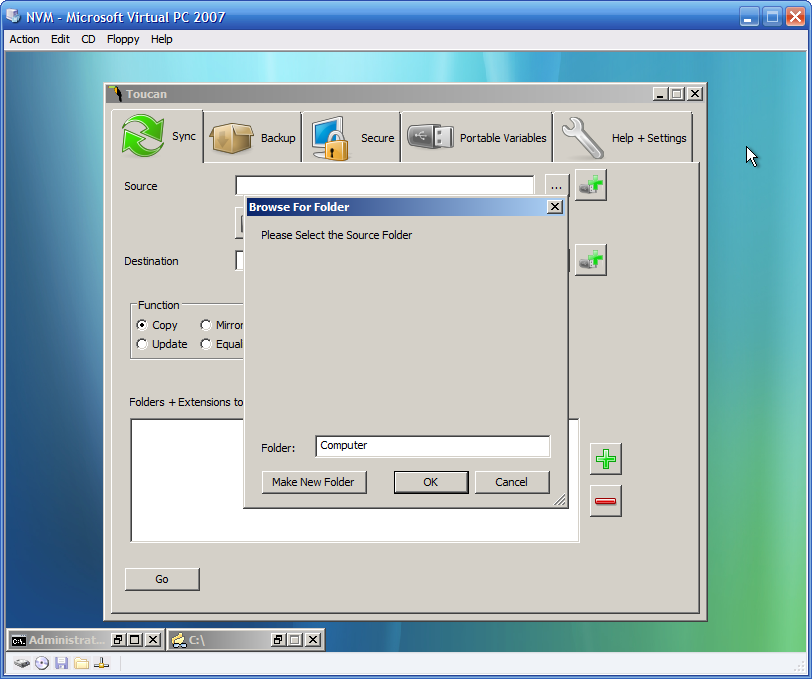
Hi, I successfully build a Winpe ISO using the Malware Removal Starter Kit & Windows Automated Installation Kit (AIK) from Microsoft. I've included several stand alone programs (Clamwin, SumatraPDF, Spybot S&D 1.5, PStart 2.11.0.5) on the CD and they are working correctly. The only problem I'm having is that when a program use the "browse for folder dialog", the folder tree area is blank (pls see screenshot). Any idea why the folder tree is not showing up? SAAM
-
slipstream the updates one by one first and then sp1. it worked for me.