-
The Fedora cursors? They're included in xpize 5R6 but might not be installed if the uninstall wasn't clean. Check your %windir%\Cursors directory. As for Luna Element, that's an issue with the shellsyle.dll, not explorer.exe. It's a minor thing, I'd overlook it. Yes sorry, cursors... After uninstalling R5 and installing R6 i've 2 folders under %windir%\Cursors, one is called Fedora Inverse with cursors and the other is Predefinita di Windows (Windows Default), empty, but from control panel i don't see any scheme called like folders Now i've created from mouse properties... Uhm
-
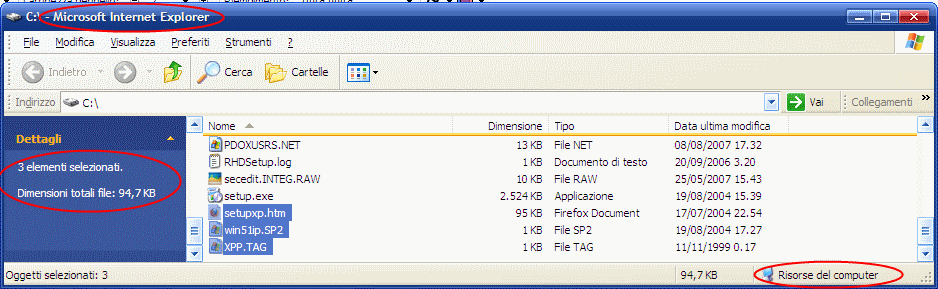
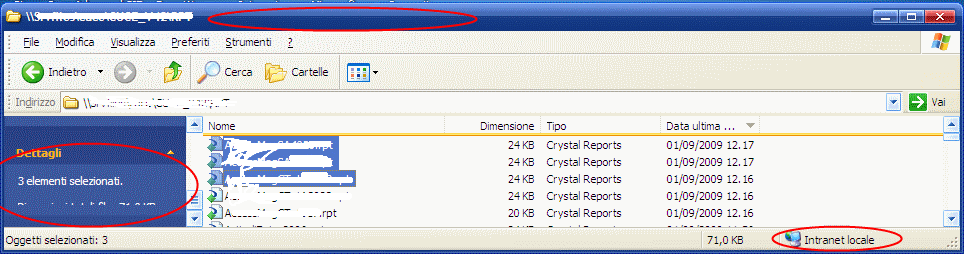
Hi. Uninstalled R5 and installed succesfully R6 but... where are fedora icons? Are they removed from R5 to R6? Thanks. P.S.: i've installed Luna Element Package Second: there's a bug in explorer patched, but not in iexplore in multiple files selection (or maybe depends on network or local?), see images:
-
Ok new italian translation here (strings relating to feedback were also in previous translation but doesn't matter)... As said more times... thanks again. it.zip
-
Here's new italian translation. Pls read unistall iussues i've added in this thread http://www.msfn.org/board/release-6-status-t137362.html Thanks again it.zip
-
Hi W3bbo. First of all thanks for yuor great job! Second, i've seen that u r fixing uninstall process, so 2 others things don't work properly: 1) (trivial) the icon's folder under resources folder is not deleted from uninstall process. 2) icon's type associations is not restored to the previous one after xpize's uninstallation: for all type that refers to icon's folder they remain wich the xpize's icon association that refer to the icon's folder mentioned above. Thanks again.
-
Here comes italian translation. Great job man! it.zip