-
Yes, I want editable, but prefilled with ProductKey from winnt.sif. But this screen with promt doesnt come up, when I install Windows.
-
if cdkey is correct, then screen doesnt come up.
-
Doesn't work. cd-key fields are empty, when instalation asks for cd-key
-
WwTIPPYwW, good idea! Thank you. I will try it today.
-
Astalavista and Screemer, thank you. I need exactly this thing, about talking Screemer :-)
-
Thank tou for answer, but no i don't wont it fully unattended. I need to have posiblity change cd-key in instalation time (but cdkey must be filled), and then I use ProvideDefault. But Instalation doesn't ask me anything about cdkey when I use UnattendMode = ProvideDefault. Why? P.S. Sorry for my English.
-
Hello. Is it possible to make unattend instalation of WinXP, where cd-key will be filled in and editable? I was make winnt.sif, but Instalation doesnt quet "eats" cdkey without asking. My winnt.sif: [Data] AutoPartition=0 MsDosInitiated="0" UnattendedInstall="Yes" [Unattended] UnattendMode=ProvideDefault OemSkipEula=Yes OemPreinstall=No TargetPath=\WINDOWS [GuiUnattended] EncryptedAdminPassword=NO OEMSkipRegional=1 [UserData] ProductKey="XXXXX-XXXXX-XXXXX-XXXXX-XXXXX" FullName="" OrgName="" [Identification] JoinWorkgroup=WORKGROUP [Networking] InstallDefaultComponents=Yes
-
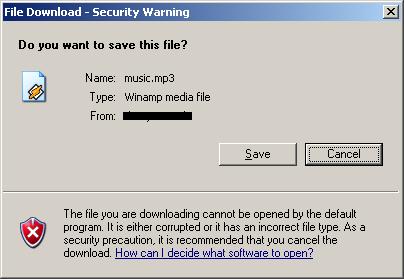
Hello. After I install SP2 for Windows XP, i cannot open some files directly wthout saving it in specefied folder. I have Security Waring, when click on link: The file you are downloading cannot be opened by default program.. etc. Before SP2, when i clicki on link, i have msg box, with buttons: Open, Save, Cancel. Now I have only 2 buttons: save, cancel. How I can turn off this Security warning?
-
I have that problem too. After updating I create ISO file, and filesize of iso is about 900MB.
-
Hello. I have Office 2003 5 in 1 CD. I was slipstream Office, Visio, OneNote with SP1, but now I can't fit all 5cd in 1 (using UltraIso optimization), becose all files was seems unpacked. How I can make 5 in 1 now? P.S. Sorry for my bad English.