Skip to content
View in the app

A better way to browse. Learn more.

MSFN

A full-screen app on your home screen with push notifications, badges and more.

To install this app on iOS and iPadOS
  1. Tap the Share icon in Safari
  2. Scroll the menu and tap Add to Home Screen.
  3. Tap Add in the top-right corner.
To install this app on Android
  1. Tap the 3-dot menu (⋮) in the top-right corner of the browser.
  2. Tap Add to Home screen or Install app.
  3. Confirm by tapping Install.

fux96

Member
  • Joined

  • Last visited

  • Country

    Pakistan
  1. fux96 replied to fux96's topic in Windows XP
    THANKS!!!! that did the trick... updated IE 7 to IE 8, now everything works.... wonderful... Keep it up...
  2. fux96 replied to fux96's topic in Windows XP
    yes, hardware was tested and reported to be good
  3. fux96 replied to fux96's topic in Windows XP
    its same in safe mode.. also no content... i didnt change windows xp in anyway i think, i unistalled some office components only (i have both office 2003 and 2007) and uninstalled office 2007 groove mui, i encounter these problems the first time, usually i install my XP myself, this time only i gave it to a specialist who has fixed troubles before which i couldnt handle, as i encountered a problem before. the prolem was, that first i got the message that the intel (pro) wirless network connection prevents windows from hibernating, you may have to update driver - the laptop had been on in this state for a while because i failed to notice it with closed lid, when i opened it and saw the message i switched it off, then it didnt come on again, it tried till windows starting screen, then crushed or so and restarted again. that guy installed windows again, ,since then i face those troubles... some other bugs also started ocurring, i cant click links from a mail in outlook express (internet page doenst open automatically anymore) and again that wireless thing happend, but i have updated this driver now...
  4. fux96 replied to fux96's topic in Windows XP
    ok, sorry... main driver igxprd32.dll Version 614.0010.4814
  5. fux96 replied to fux96's topic in Windows XP
    windows XP professional V2002, SP3 free HDD: C: round 3 GB free of 15GB D: 5 free of 64 1GB RAM, 1.83 GHz Legacy Audio / Video drivers thats what u wanted??
  6. fux96 posted a topic in Windows XP
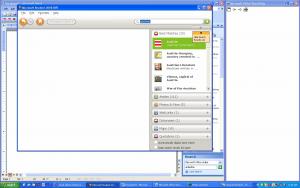
    I have a strange problem. some of my programs (microsoft encarta, help files of microsoft office progs...) show the headlines (i.e in the encarta the window opens, i can enter a search term, the results show - text a pics - in the side panel, but if i want to actually open one, the window only shows blank content. Also when i close it, as usually encarta opens a window saying "encarta search bar is still open... " this window is empty same happens with help files from word, excel etc. it shows the tabs index, search etc, but no matter which i open, they show empty content... any one knows what to do?? i added a screen shot of the encarta and help file..

Account

Navigation

Search

Search

Configure browser push notifications

Chrome (Android)
  1. Tap the lock icon next to the address bar.
  2. Tap Permissions → Notifications.
  3. Adjust your preference.
Chrome (Desktop)
  1. Click the padlock icon in the address bar.
  2. Select Site settings.
  3. Find Notifications and adjust your preference.