Skip to content
View in the app

A better way to browse. Learn more.

MSFN

A full-screen app on your home screen with push notifications, badges and more.

To install this app on iOS and iPadOS
  1. Tap the Share icon in Safari
  2. Scroll the menu and tap Add to Home Screen.
  3. Tap Add in the top-right corner.
To install this app on Android
  1. Tap the 3-dot menu (⋮) in the top-right corner of the browser.
  2. Tap Add to Home screen or Install app.
  3. Confirm by tapping Install.

kraye

Member
  • Joined

  • Last visited

  • Country

    Canada

Everything posted by kraye

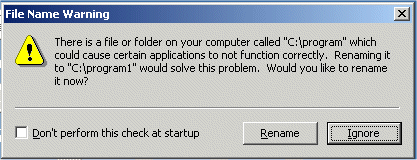
  1. Whenever i reboot my W2K workstation machine, i get this dialog box (attached) with the title: "File Name Warning". It says, "You have a file or folder on your computer called 'C:\program' which could cause certain applications to not function correctly. Renaming it to 'C:\program1' would solve this problem. Would you like to rename it now?" Well, with all hidden folders visible, there's no such folder on the drive AND the whole deal seems quite strange to me. Somehow, i just can't believe that MS would arbitrarily suggest a new name for a folder in a dialog. My experience is that they might suggest an action, but usually won't specify anything so exact as a name. Maybe i'm wrong, but i don't want to click on this thing until i'm convinved its for real. I'm hoping someone might have some insight into this. Kat


Account

Navigation

Configure browser push notifications

Chrome (Android)
  1. Tap the lock icon next to the address bar.
  2. Tap Permissions → Notifications.
  3. Adjust your preference.
Chrome (Desktop)
  1. Click the padlock icon in the address bar.
  2. Select Site settings.
  3. Find Notifications and adjust your preference.