Skip to content
View in the app

A better way to browse. Learn more.

MSFN

A full-screen app on your home screen with push notifications, badges and more.

To install this app on iOS and iPadOS
  1. Tap the Share icon in Safari
  2. Scroll the menu and tap Add to Home Screen.
  3. Tap Add in the top-right corner.
To install this app on Android
  1. Tap the 3-dot menu (⋮) in the top-right corner of the browser.
  2. Tap Add to Home screen or Install app.
  3. Confirm by tapping Install.

Yunus

Member
  • Joined

  • Last visited

  • Country

    Netherlands
  1. Thnx [bM]Crusher i'll try it out in the morning its almost 3 am here need some sleep. Thnx cheeers
  2. ANYONE KNOW'S IF this will work start /wait %systemdrive%\Install\Applications\Office2003\setup.exe TRANSFORMS=%systemdrive%\Install\Applications\Office2003\unattended.MST /qb- i think the problem is that setup can't find the MST file I hope it works this way
  3. sixpack als ik die unattended.MST nou weglaat krijg ik dan een standaart office 2003 installatie ? waarbij ik later toch de cd erbij moet pakken?
  4. Thanks sixpack for the quickreply but will the installation read out the settings off unattended.MST when i take it out. I dont want to put in the serials and configure stuff during installation. Bedankt nog
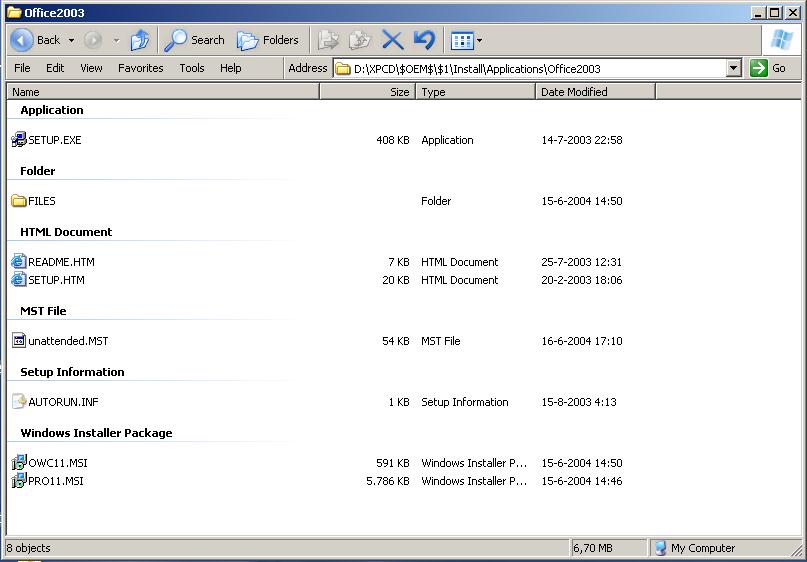
  5. Hiya everybody i'm new to msfn.org its a great place i have been reading the forums for a while and i came across a office 2003 problem and didn't want to open a new thread. The problem is it wont install, i'm not getting any error messages what so ever . I first off made a Administrative Installation Point using the Custom Installation Wizard i created a .MST file but nothing is happening. here's the setup using RunOnceEx.cmd REG ADD %KEY%\080 /VE /D "Office 2003" /f REG ADD %KEY%\080 /V 1 /D "%systemdrive%\Install\Applications\Office2003\SETUP.EXE TRANSFORMS=unattended.MST /qb-" /f I attached a Directory Screenshot where the unattended.MST is located I hope someone can help me out havent figured it out for a couple of days i think its something small i cant see Thanks in advance


Account

Navigation

Configure browser push notifications

Chrome (Android)
  1. Tap the lock icon next to the address bar.
  2. Tap Permissions → Notifications.
  3. Adjust your preference.
Chrome (Desktop)
  1. Click the padlock icon in the address bar.
  2. Select Site settings.
  3. Find Notifications and adjust your preference.