




Everything posted by t6nv1r
-
Check this link for more........... http://social.technet.microsoft.com/Forums...c6-62161901b714
-
Hi, I am using Windows 7 as my OS. However, my problem is that, unlike in my Windows XP's Windows Media Player, in my Windows 7, I can't add lyrics into my mp3 files anymore. This is because whenever I enter my mp3 files' properties to edit, I can't find "lyrics" anymore, which means to say I can't add lyrics. More over Windows media player 12 don't have the "Advanced Tag Editor" for adding lyric from WMP library. Is there any way I can add lyrics again, using Windows Media Player 12 or *mp3 file properties edit option, and not some other programs (in windows 7).
-
I just replace The Data2.cab file manually & than repacked all. It's works. Thanks.
-
The error message:
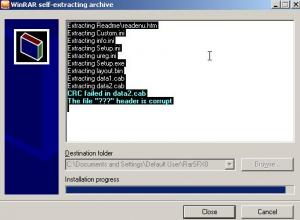
-
Thanx 4 your post & support. did u test this ?? I tested: It integrated successfully with nLite but didn't work in the windows installation mode(have some extracting error).
-
Its not install silently.
-
I am trying to integrate Power DvD 6 using nLite. That's why I make Power dvd 6 addon (.cbb) using nLite add-on maker. Then I integrate it using nLite. But when I check the Iso on vmware Power DvD 6 is not installing silently. I need to install it manually on the windows setup mode. So what can I do to integrate power DvD 6 silently.
