-
the WPI don't want to start
-
Thx going to try it
-
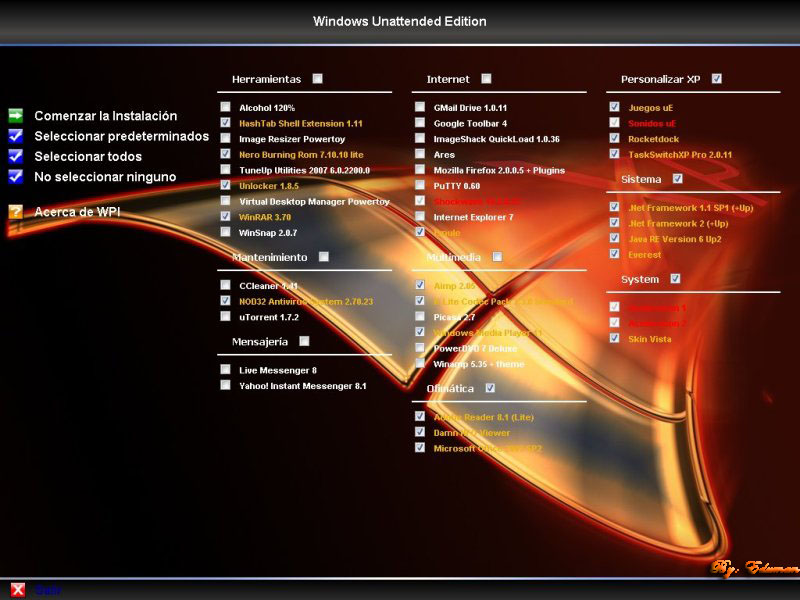
I want t make a menu installer like the one in the screen shot attached to the post if some could help i will really aprecciate.
-
ok just found that the logonui.exe is not the problem is the boot screen i remove and place the logonui back to see if it work and it did so i have to know how to install the boot screen my method was replace the original with the cutsom one with the .ex_ estension
-
sry for cap letter
-
YES IT IS
-
the other topic i found did not gave me and answer i having a little problem with this code @echo off cmdow @ /HID REGEDIT /S %systemdrive%\Install\logonui.reg EXIT this is the cmd file and i'm having the cmdow problem not regconized any help abd the reg file is this one Windows Registry Editor Version 5.00 ; Set default logonscreen to logonui.exe [HKEY_LOCAL_MACHINE\SOFTWARE\Microsoft\Windows NT\CurrentVersion\Winlogon] "UIHost"="%windir%\\system32\\logonui.exe"
-
i manage to work the boot screen and ity look like in 16 bit colors (i see a solution in other topic but don't remember) so if any help it will be appreciate NOW my problem is the logonui.exe I use makecab to change the .exe to .ex_ work good and the replace in the i386 directory now here the problem itt say autochk program not found - skipping AUTOCHECK then it appear blue screen that say STOP:c000021a {fatal system error} The session manager initialization system process terminated unexpectedly with a status of 0xc000003a (0x00000000 0x00000000). The sytem has been shut down.
-
thx
-
[Computer] acpiapic_mp = "ACPI Multiprocessor PC",files.none acpiapic_up = "ACPI Uniprocessor PC",files.none acpipic_up = "Advanced Configuration and Power Interface (ACPI) PC",files.none syspro_mp = "Compaq SystemPro Multiprocessor or 100% Compatible",files.none mps_up = "MPS Uniprocessor PC",files.none mps_mp = "MPS Multiprocessor PC",files.none e_isa_up = "Standard PC",files.none 486c_up = "Standard PC with C-Step i486",files.none here the more details
-
There is no sata driver installed no driver integrated. so it can't be a problem with sata controller. the entry "" i did not find it etheir in the computer section
-
my problem is with the txtsetup.sif it say: The entry "" in the unattended script file doesn't exist in the [Computer] of the INF file txtsetup.sif. setup cannot continue [Computer] acpiapic_mp = "ACPI Multiprocessor PC",files.none acpiapic_up = "ACPI Uniprocessor PC",files.none acpipic_up = "Advanced Configuration and Power Interface (ACPI) PC",files.none syspro_mp = "Compaq SystemPro Multiprocessor or 100% Compatible",files.none mps_up = "MPS Uniprocessor PC",files.none mps_mp = "MPS Multiprocessor PC",files.none e_isa_up = "Standard PC",files.none 486c_up = "Standard PC with C-Step i486",files.none