Skip to content
View in the app

A better way to browse. Learn more.

MSFN

A full-screen app on your home screen with push notifications, badges and more.

To install this app on iOS and iPadOS
  1. Tap the Share icon in Safari
  2. Scroll the menu and tap Add to Home Screen.
  3. Tap Add in the top-right corner.
To install this app on Android
  1. Tap the 3-dot menu (⋮) in the top-right corner of the browser.
  2. Tap Add to Home screen or Install app.
  3. Confirm by tapping Install.

nissea

Member
  • Joined

  • Last visited

  • Country

    Finland
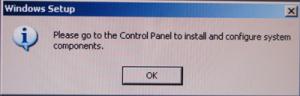
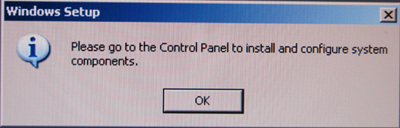
  1. hello all, my unattended Window Home Server 2003 stop installing updates, programs after second boot, because this windows setup box come up. "Please go to the control panel to instal and configure system components" then i hit the ok button to continue instal, but its annoying and interrupt my coffee break. how i can disable this windows setup box. I am not sure my english vrite skils, but i hope all understand. Thanks.
Account

Navigation

Search

Search

Configure browser push notifications

Chrome (Android)
  1. Tap the lock icon next to the address bar.
  2. Tap Permissions → Notifications.
  3. Adjust your preference.
Chrome (Desktop)
  1. Click the padlock icon in the address bar.
  2. Select Site settings.
  3. Find Notifications and adjust your preference.