-
yes I have figured that out too now but when I click with nLite on that All folder it only induces one INF file. I want the entire All folder integrated. thanks
-
could somebody explain for the nobs on how to extract the chipset INF's from the Intel Exe or Zip file. http://downloadcenter.intel.com/download.a...ms〈=eng I want to integrate the Intel 945 Chipset Drivers and all the others that come with that zip file but have no clue on how to get them out. the post aboe says with -A -P C:\Path but I have no clue on how to do that. thanks
-
I'm trying to slipstream Office 2007 Enterprise Edition and SP1 but it seems like nothing ever happens. The log file says files have been copied but the service pack has not been applied. Not sure what's wrong here? Slipstream Office 2003 with SP3 worked without any problems and the CD works perfectly. Could anybody give me some insights on how to do it with Office 2007 Enterprise Edition the slipstreaming process. I was able to do it with Expression Web to slipstream SP1 but no luck with Office 2007 thanks BD
-
thank you for the link - really appreciate it!!
-
where can I find the addon for the Zune Theme for XP. I did a search but nothing came up. thanks BD
-
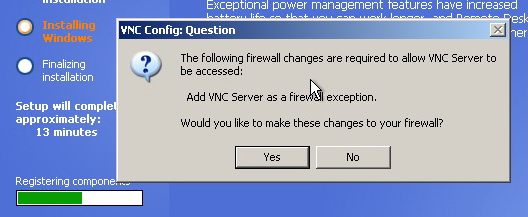
I have tried to do a silent install of the new RealVNC Enterprise edition 4.4.1 but a message pops up asking to configure the Windows XP Firewall to automatically work with RealVNC. I have successully integrated previous versions into Windows XP but the new 4.4.1 now hangs at that question. here is the InF I found from a previous version and that always worked so far but now a box pops up asking to say yes or no during install to configure RealVNC with the Windows Firewall. any suggestions? [EditFile] I386\SVCPACK.INF,SetupHotfixesToRun,AddProgram [AddProgram] RealVNC441.exe /VERYSILENT /SP-
-
fixed user error here I forgot to check blank password on the Admin screen all working now. too bad I can't keep the slipstreamed CD under 700MB with SP3, IE7, WMP11 and a few other things. BD
-
my intallation accpepts the CD-Key with no problems but the installation hangs where it says: you must assign a name to the computer and the Admin password is blank. I don't want to have an Admin password and for the Computer Name I have used: XP not sure where the mistake is but I have re-checked my settings several times.
-
I have created a slipstreamed Custom XP-Pro CD with SP3 and all work fine but during installation it always hangs at the Computer Name screen with the Administrator password. I have unchecked that Admin requires password but still hangs. So far I have tried it 4 times and no luck. I don't want that there is an Admin password. for the Computer Name I have assigned: XP the Admin password I left blank: any suggestions??