



Skip to content
View in the app

A better way to browse. Learn more.

MSFN

A full-screen app on your home screen with push notifications, badges and more.

To install this app on iOS and iPadOS
  1. Tap the Share icon in Safari
  2. Scroll the menu and tap Add to Home Screen.
  3. Tap Add in the top-right corner.
To install this app on Android
  1. Tap the 3-dot menu (⋮) in the top-right corner of the browser.
  2. Tap Add to Home screen or Install app.
  3. Confirm by tapping Install.

Arash

Member
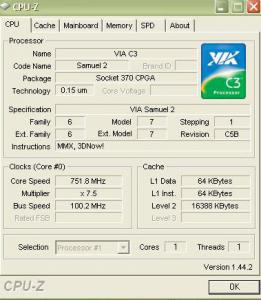
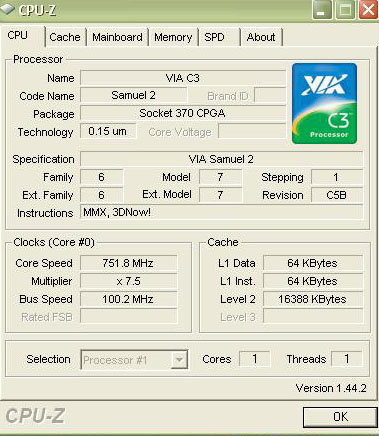
  1. lol i saw one Strange thing in My PC (P3-Cpu: Cyrix3 750 Mhz) / CPU-Z show My Level2 (L2) Cache Is 16 MB !!!!! Compare it with Intel Extreme Quad Core QX9770 With 12MB L2 Cache !!!!! U can see it in My ScreenShot / Is It True??!! Its Realy 16MB ??
  2. Thanx Ponch
  3. Hi Dear Friends.I have one MainBoard ( ATC-7401E ) Pentium3 With 750Mhz CPU and 128MB RAM-MY OS XP-Pro-SP2 Can I Use ADSL ( 128-256-512Kb/s) ??? OtherWise This MainBoard How Much Data Can Transfer With USB?-Thanx
  4. Arash posted a topic in Windows Vista
    Hi Dear Friends.I Bought one Windows Vista Ultimate But it Cant Istall It. MY PC is Pentium3 (750MHz VIA-Cyrix3 CPU) My MainBoard is ATC-7401-i bought it in 2001. With 128MB SDram-32MB Internal Video Memory and 80GB IDE Maxtor H.D.D.What i Must Do For it Install? Thank You
Account

Navigation

Configure browser push notifications

Chrome (Android)
  1. Tap the lock icon next to the address bar.
  2. Tap Permissions → Notifications.
  3. Adjust your preference.
Chrome (Desktop)
  1. Click the padlock icon in the address bar.
  2. Select Site settings.
  3. Find Notifications and adjust your preference.